Connect with us
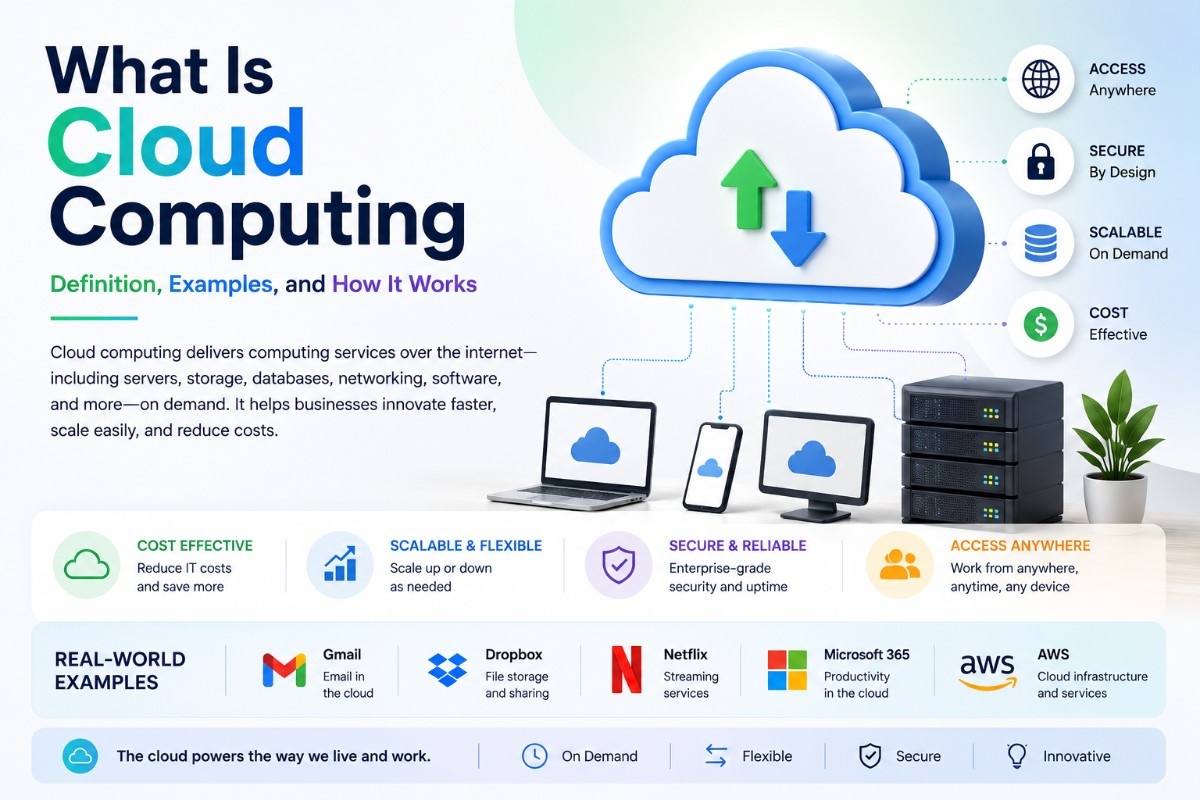
What Is Cloud Computing — Definition, Examples, and How It Works
Cloud computing is the delivery of computing services — servers, storage, databases, networking, and software — over the internet, letting businesses access powerful technology on demand instead of owning and maintaining physical hardware.
This guide covers exactly what you need:
- What cloud computing is and its official definition
- What AI in cloud computing actually means
- Cloud computing security basics every business should know
- Virtualization — the core technology powering the cloud
- Types of cloud services and deployment models
- Real world examples every beginner can understand
What Is Cloud Computing?
Cloud computing is defined by the International Organization for Standardization as a paradigm enabling network access to a scalable and elastic pool of shareable physical or virtual resources with self-service provisioning and administration on demand. In simpler terms, instead of buying and managing your own servers, you rent computing power, storage, and software from a provider over the internet.
The National Institute of Standards and Technology identifies five essential characteristics of cloud systems: on-demand self-service, broad network access, resource pooling, rapid elasticity, and measured service. The goal of cloud computing is to let users benefit from these technologies without needing deep technical expertise in any one of them, cutting IT costs while letting businesses focus on their core operations instead of infrastructure management
What Is AI in Cloud Computing
AI in cloud computing refers to the integration of artificial intelligence tools directly into cloud infrastructure and services, enabling automated monitoring, smarter resource allocation, and intelligent security responses. The relationship between cloud and AI has become deeply intertwined in 2026 — businesses have spent recent years building AI-friendly cloud infrastructure, and most organizations have now moved their AI strategies from experimental phases into full production.
A notable trend in 2026 is the growing adoption of AI agent meshes, infrastructure components that mediate communication between AI agents and AI models. These meshes track AI agent status across an enterprise, enforce governance controls, mitigate cybersecurity threats by filtering sensitive data, and reduce costs by routing requests to more cost-effective models. AI-driven monitoring tools also increasingly learn normal cloud behavior patterns to catch genuine anomalies while reducing false alerts.
What Is Cloud Computing Software
Cloud computing software refers to applications and platforms delivered through one of three primary service models. Infrastructure as a Service provides virtualized computing resources like servers and storage. Platform as a Service offers development and deployment environments for building applications. Software as a Service delivers complete, ready-to-use applications directly to end users without any installation or local maintenance.
Cloud software shifts the maintenance burden away from the customer entirely — providers handle automatic software updates and security patches, eliminating the overhead of individual license management. This is one of the most cited reasons businesses move away from traditional locally installed software toward cloud-based alternatives.
What Is Cloud Computing With Example
A practical example: Amazon EC2 is an Infrastructure as a Service offering that provides virtual servers in the cloud, allowing businesses to create, manage, and scale computing resources as needed without purchasing physical hardware. Similarly, AWS Lambda is a Function as a Service offering that runs code automatically in response to events — like a photo upload — without requiring the business to manage any servers at all, charging only for the time the code actually runs.
On the software side, everyday cloud computing examples include email platforms, video streaming services, and team collaboration tools that run entirely through a web browser rather than installed software, with the provider handling all backend infrastructure invisibly.
What Is Cloud Computing Security
Cloud computing security covers the practices and technologies that protect cloud-based infrastructure, applications, and data from threats. Responsibility is typically shared — the customer remains responsible for security in the cloud, including managing access permissions, encrypting data, and configuring firewalls, while the provider secures the underlying infrastructure itself.
The security landscape has shifted significantly heading into 2026. The traditional security perimeter has essentially dissolved, with organizations now governing a fluid ecosystem where autonomous AI agents and ephemeral cloud workloads interact at machine speed. Non-human identities — service principals, secrets, and autonomous agents — now outnumber human users in many cloud environments by a ratio of 100 to 1, making identity-based security increasingly critical. Despite rising complexity, organizations have made measurable progress, with high-risk workload combinations involving public exposure, vulnerability, and excessive privilege dropping from 38% in early 2024 to 29% by mid-2025.
What Is Virtualization in Cloud Computing
Virtualization is the foundational technology that powers cloud computing, allowing a single physical hardware system to create multiple simulated environments known as virtual machines. Before virtualization, a physical server could typically run only one operating system, often wasting the majority of its capacity if an application used only a fraction of available resources.
A software layer called a hypervisor sits between the physical hardware and the virtual machines, allocating CPU, memory, and storage resources to each virtual machine while keeping them isolated from one another. Each virtual machine operates as an independent system with its own operating system and applications, even though multiple machines share the same underlying physical hardware. This is what allows cloud providers to serve many customers efficiently from the same physical infrastructure while maintaining security and performance isolation between them.
What Is Cloud Computing Definition
In its most concise definition: cloud computing is a model for delivering computing resources — including servers, storage, databases, networking, software, and intelligence — over the internet on a pay-as-you-go basis, eliminating the need for organizations to own and maintain physical computing infrastructure themselves.
Types of Cloud Computing Services
Cloud services are generally organized into three primary models. Infrastructure as a Service (IaaS) gives businesses access to virtualized computing resources like servers, storage, and networks through the internet, with users paying only for what they consume. Platform as a Service (PaaS) provides a development Microsoft Azure provide public, private, and hybrid cloud solutions. deployment environment, abstracting away the underlying infrastructure so developers can focus purely on building applications. Software as a Service (SaaS) delivers complete, ready-to-use applications directly to users, requiring no installation or infrastructure management at all.
Beyond service models, cloud computing also includes distinct deployment models. Public cloud infrastructure is owned and operated by a third-party provider and made available to anyone over the internet, offering massive scalability and pay-as-you-go pricing. Private cloud is dedicated to a single organization, offering greater control and security at the cost of higher capital investment. Hybrid cloud combines both approaches, letting organizations keep sensitive data on private infrastructure while leveraging public cloud scalability for other workloads.
Benefits of Cloud Computing for Businesses
Cloud computing delivers cost efficiency by eliminating the need for individual software licenses and reducing the overhead of in-house IT support. Businesses gain flexibility and control over virtualized resources while avoiding the capital expense of purchasing and maintaining physical servers. Automated software updates ensure organizations always run the latest features and security patches without manual intervention.
For growing businesses specifically, the elastic nature of cloud resources means capacity can scale up or down automatically based on demand, with capabilities appearing virtually unlimited to the consumer and available for provisioning in any quantity at any time. This rapid elasticity is particularly valuable for businesses with unpredictable or seasonal workloads that would otherwise require significant upfront investment in physical infrastructure sized for peak demand.
Leading providers like Google Cloud help businesses scale computing resources on demand while reducing infrastructure costs.
Cloud-powered instant messaging platforms also help businesses improve communication and collaboration across distributed teams.
Cloud Computing vs Traditional Computing
Traditional computing requires organizations to purchase, house, and maintain physical servers themselves — a capital-intensive approach requiring dedicated space, hardware, and environmental controls that must be periodically refreshed at additional cost. This self-run model has drawn criticism because organizations still have to buy, build, and manage their own infrastructure, lacking the economic flexibility that makes cloud computing attractive in the first place.
Cloud computing shifts this burden to the provider, converting large upfront capital expenses into predictable operating costs while giving businesses access to virtually unlimited scalability on demand. The trade-off is that customers depend on the provider's service level agreements, which typically exclude planned maintenance, network issues, and certain external factors from guaranteed uptime commitments — meaning businesses must understand exactly what their provider does and does not guarantee.
How Cloud Storage Works Within Cloud Computing
Cloud storage is a core cloud computing service that lets businesses and individuals store data on remote servers accessed via the internet, rather than on local hard drives or on-premise infrastructure. Storage virtualization specifically abstracts physical storage resources into a single virtual system, improving how that storage is managed and utilized across an organization.
Data stored in the cloud is typically distributed and replicated across multiple servers for reliability, meaning a single hardware failure does not result in permanent data loss. This redundancy, combined with integration into broader cloud data security services, strengthens both data protection and business continuity for organizations relying on cloud storage for critical information.
Cloud Computing Infrastructure Explained
Cloud computing infrastructure begins with physical hardware — servers containing CPU, RAM, storage, and network resources — managed through virtualization software that creates and allocates virtual machines across that hardware. A hypervisor running directly on physical hardware, known as a bare metal hypervisor, typically delivers superior performance and security compared to other virtualization approaches.
Beyond compute virtualization, cloud infrastructure extends to network virtualization, which creates virtual versions of routers, switches, and firewalls independent of physical equipment, simplifying network management while improving security through segmentation. Desktop virtualization further extends this infrastructure by hosting entire desktop environments on centralized servers, allowing employees to access consistent desktops remotely from any device — a capability that has become especially valuable for organizations supporting distributed teams and work from home environments
For businesses building on this kind of infrastructure, exploring how cloud-delivered software fits into a broader technology strategy starts with understanding the SaaS meaning behind many modern business applications, alongside how team communication tools and remote work setups increasingly depend on this same underlying cloud infrastructure to function reliably.
Conclusion
Cloud computing has fundamentally changed how businesses access and pay for technology, shifting computing power from a capital expense into an on-demand, scalable service available over the internet.
Quick summary:
- Cloud computing delivers servers, storage, software, and networking over the internet rather than through owned physical hardware
- Virtualization is the core technology that makes efficient cloud infrastructure possible
- AI integration is rapidly transforming cloud management, security, and automation in 2026
- Security responsibility is shared between cloud providers and customers, with the perimeter increasingly defined by identity rather than physical location
- Service and deployment models — IaaS, PaaS, SaaS, public, private, and hybrid — give businesses flexibility to match their specific needs
- Understanding these fundamentals makes it significantly easier to evaluate any cloud-based tool or platform your business considers adopting going forward.
Frequently Asked Questions (FAQs)
Q1. What is cloud computing in simple terms?
Cloud computing is the delivery of computing services — like servers, storage, databases, networking, and software — over the internet instead of through physical hardware you own and maintain. Rather than buying and managing your own servers, you rent computing power and storage from a provider on a pay-as-you-go basis. This allows businesses to access powerful technology on demand, scale resources up or down as needed, and avoid the upfront capital expense of building and maintaining physical IT infrastructure themselves.
Q2. What are the main types of cloud computing services?
Cloud computing services fall into three primary models. Infrastructure as a Service (IaaS) provides virtualized computing resources like servers and storage, giving businesses control over operating systems and applications. Platform as a Service (PaaS) offers a development and deployment environment so developers can focus on building applications without managing infrastructure. Software as a Service (SaaS) delivers complete, ready-to-use applications directly to users, requiring no installation, with the provider handling all maintenance, updates, and security patches automatically.
Q3. How does virtualization work in cloud computing?
Virtualization is the foundational technology behind cloud computing, allowing a single physical server to create multiple virtual machines using a software layer called a hypervisor. Each virtual machine runs its own operating system and applications independently, even though multiple machines share the same underlying hardware. This approach maximizes hardware efficiency, since idle computing resources can be allocated dynamically across virtual machines instead of sitting unused, while also keeping each virtual environment securely isolated from the others.
Q4. Is cloud computing secure for businesses?
Cloud security follows a shared responsibility model — the provider secures the underlying infrastructure, while the business remains responsible for managing access controls, encrypting data, and configuring its own applications securely. In 2026, security has shifted heavily toward identity-based protection, since non-human identities like automated processes and AI agents now significantly outnumber human users in many cloud environments. Businesses that adopt strong access controls, encryption, and continuous monitoring can operate cloud environments securely, though no provider guarantees protection against every possible risk
Q5. What is an example of cloud computing in everyday use?
Common everyday examples include email platforms, video streaming services, and team collaboration tools that run entirely through a web browser without requiring any local installation. On the technical side, Amazon EC2 provides virtual servers that businesses can scale on demand, while AWS Lambda runs code automatically in response to specific events without requiring any server management at all. These examples show how cloud computing removes the need for users to understand or manage the underlying infrastructure powering the services they use daily