Connect with us
5 Visual Content Problems Marketing Teams Can Solve with AI
Marketing teams at technology companies work with a constant stream of visual content. SaaS landing pages, app screenshots, device photos, product launch graphics, social posts, display ads, tutorial videos, and software demos often need to be prepared for several channels at once. Effective team collaboration can help keep these workflows organized, especially when marketers, designers, and other teams need to coordinate on campaign assets. The challenge is that the source files are not always ready to publish, and sending every small visual fix back to a designer or video editor can slow down campaigns.
Unwanted elements are a common example. A useful laptop, smartphone, or product photo can be difficult to publish because of cables, temporary labels, reflections, people in the background, test equipment, or another distracting detail. An Object Remover can help marketing teams clean up those distractions and make existing tech images more suitable for campaigns without recreating the entire visual.
Video creates another set of challenges. Product demonstrations, software walkthroughs, screen recordings, webinar clips, and smartphone footage may look soft after compression or repeated sharing. An AI-powered Video Enhancer can help improve video quality and clarity, giving technology marketing teams another option when the footage is still useful but needs a more polished look for its next use.
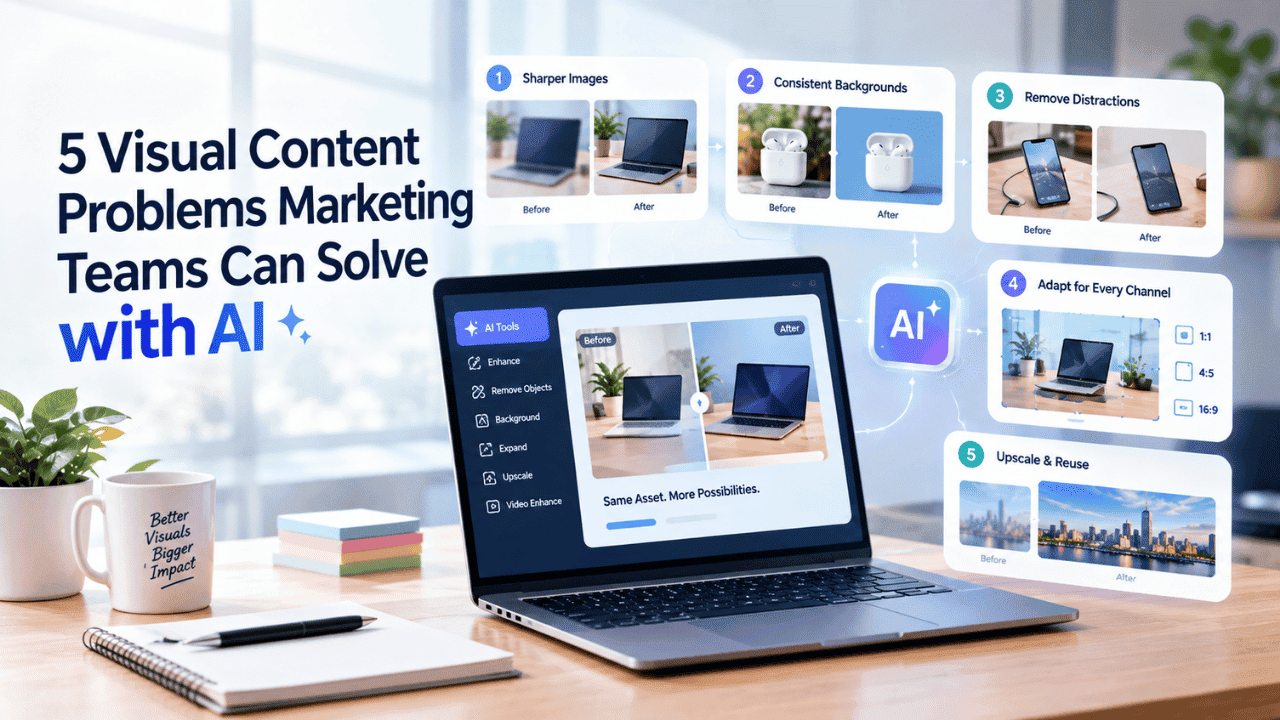
Here are five common visual content problems marketing teams face in technology campaigns and how AI editing tools can help address them.
1. Campaign Images Don't Look Sharp Enough
Not every technology campaign starts with a professional photo shoot. Marketing teams often work with smartphone photos, product screenshots, images supplied by partners, older launch assets, screenshots from internal tools, and files copied from documentation or cloud storage.
These images can lose quality through compression, resizing, exporting, or repeated sharing. The problem becomes more noticeable when a small screenshot needs to appear in a larger website hero section, a paid advertisement, a product comparison, or a high-resolution presentation.
An AI photo enhancer can help improve visible detail and overall clarity in these assets. Instead of immediately rejecting a useful screenshot or product image, marketers can enhance it and review whether the improved version is suitable for the campaign.
This can be especially useful for SaaS startups, app teams, hardware brands, and smaller technology companies that need to move quickly with limited creative resources. Human review still matters because interface text, icons, ports, buttons, and product details should remain accurate after enhancement.
2. Backgrounds Are Inconsistent Across Campaign Assets
Consistency matters when several technology visuals appear together. A set of smartphone, laptop, accessory, or smart-home product images can look disconnected if every item has a different background, lighting setup, or surrounding environment.
The same issue appears in software marketing. A team may combine employee photos, device mockups, app screens, and partner-supplied images in one launch campaign, even though the files were created at different times and with different visual styles.
An AI background remover can isolate the main subject from its existing surroundings. Marketing teams can then place a device, person, or other subject against a background that better matches the campaign design, website theme, or product page.
The same transparent asset can also be reused across website banners, feature pages, app-store graphics, social posts, advertisements, pitch decks, and other technology marketing materials. That makes one approved visual more flexible across multiple channels.
3. Good Photos Contain Unwanted Distractions
Sometimes a technology image is almost ready to publish except for one small detail. A laptop photo may include an unnecessary cable. A smartphone image might show packaging or temporary labels. An office photo may contain a monitor with irrelevant content, while an event image can include signs, equipment, or people that distract from the main subject.
Retaking the photograph is not always practical, especially after a product shoot, conference, customer visit, or launch event has already finished.
An AI object remover allows teams to select unwanted elements and remove them while reconstructing the affected area from the surrounding image. This can turn an otherwise difficult-to-use photo into a cleaner visual for a landing page, article, social campaign, or product promotion.
The goal should be cleanup rather than misrepresentation. Technology marketers should avoid changing meaningful product characteristics such as ports, controls, screen content, dimensions, accessories, or physical features that buyers rely on when evaluating a device.
4. One Image Doesn't Fit Every Marketing Channel
Technology marketing teams rarely publish a visual in only one place. A wide SaaS dashboard image may work perfectly as a website banner but poorly in a vertical social post. A square device image may fit an online store but leave too little room for a headline when used in an advertisement.
Cropping can solve part of the problem, but it can also cut off important interface elements, hardware details, or the visual space needed for campaign copy.
An AI image extender can create additional visual space around an existing image. This gives teams more flexibility when adapting one source asset to different dimensions and layouts without stretching the original subject.
For example, a software company could add space beside a dashboard screenshot for a callout, while a hardware brand could expand the area around a laptop or smartphone for a wider banner. A strong campaign visual can then be prepared for websites, ads, social platforms, newsletters, and presentations without requiring a separate photo shoot for every format.
5. Existing Visuals Are Too Small for New Campaigns
Technology companies often build large libraries of screenshots, product photos, diagrams, event images, tutorial graphics, and launch assets. Older files may still be useful, but many were created for smaller screens, previous website layouts, or social platforms with lower resolution requirements.
Reusing those files in larger layouts can expose pixelation, soft text, and loss of detail. This is common when an original design file or high-resolution product photo is no longer available.
An AI image upscaler can increase image dimensions while working to preserve important edges, textures, interface shapes, and visible details. It can make selected older assets more practical for modern digital placements without simply stretching the pixels.
Upscaling still has limits, so the result should be reviewed carefully. For technology visuals, the team should check small text, logos, screen elements, device edges, connectors, and other details that need to remain faithful to the original asset.
Making More Use of Existing Video Content
The same principle applies to video. Technology marketing teams accumulate product demonstrations, app walkthroughs, interviews, webinars, event footage, tutorials, customer stories, feature announcements, and short social clips over time.
Not all of this material needs to be recorded again simply because its visual quality no longer matches current campaign requirements. When the product information is still accurate and the footage remains relevant, video enhancement can help teams explore whether it can be reused.
AI video enhancement tools can improve the visual quality of existing footage before it is repurposed for a product page, knowledge base, website campaign, presentation, paid ad, or social channel. This is particularly useful when a recording contains a strong demonstration or explanation that would be difficult to reproduce exactly.
For smaller technology marketing teams, getting more value from existing footage can reduce unnecessary production work and extend the useful life of content that has already been reviewed and approved.
A More Flexible Visual Workflow for Marketing Teams
AI editing works best when it supports the normal creative workflow rather than replacing it. A technology marketing team might receive a product image, improve its clarity, remove a distracting object, separate the subject from the background, and adapt the composition for several channels before sending the final asset through the usual review process.
The same workflow can apply to SaaS screenshots, app graphics, device photography, event images, product tutorials, and demonstration videos. Different AI editing tools can support each stage depending on the exact problem that needs to be solved.
Human review remains important in technology marketing because visual accuracy can affect how users understand a product. Teams should check interface details, product features, text, branding, and any claims shown inside the final creative before publication.
Used carefully, AI editing can help marketing teams respond faster to changing campaign needs, reuse valuable visual assets, and prepare technology content for more channels without turning every small adjustment into a separate production task.
Conclusion
Technology marketing teams don't need a full reshoot every time a visual falls short of campaign standards. AI editing tools give teams a practical middle step—sharpening a soft screenshot, removing a stray cable, matching backgrounds, resizing for a new channel, or breathing new life into old footage—before content goes through the usual review process. Used thoughtfully, these tools help smaller teams stretch limited creative resources further, keep existing assets relevant longer, and respond to campaign needs faster, all while human oversight ensures every product detail stays accurate and trustworthy.
FAQs
Q1. What is an AI object remover, and how does it help marketing teams?
An AI object remover lets teams select unwanted elements in a photo—like cables, labels, or background clutter—and removes them while reconstructing the surrounding area naturally. This helps marketing teams reuse otherwise good product or event photos without needing a reshoot, saving both time and production costs during campaign preparation.
Q2. Can AI tools really improve the quality of an old or low-resolution image?
Yes. AI photo enhancers and upscalers can sharpen detail, reduce blurriness from compression, and increase image dimensions while preserving edges and textures. However, results should always be reviewed carefully, since fine details like logos, screen text, or interface elements need to remain accurate after enhancement.
Q3. Why do product images need consistent backgrounds across a campaign?
When device photos, screenshots, and employee images all have different backgrounds, a campaign can look disjointed and unpolished. An AI background remover isolates the subject so it can be placed on a consistent background, making the same asset reusable across banners, social posts, and product pages.
Q4. How can one image be adapted for multiple marketing channels without cropping issues?
An AI image extender adds visual space around an existing photo instead of cropping it, preserving important details like interface elements or product features. This lets one source image be reshaped for banners, vertical social posts, and ads without distorting the subject or losing key information.
Q5. Does AI editing replace the need for human review in marketing content?
No. AI editing supports the creative workflow but doesn't replace human judgment. Marketing teams still need to review interface accuracy, product features, branding, and text before publishing, since visual changes can affect how customers perceive and understand a product or claim.
Q6. What kind of video content can benefit from AI enhancement?
Product demos, software walkthroughs, webinar clips, and customer testimonials that have lost sharpness through compression or repeated sharing can be improved with AI video enhancement. This extends the useful life of already-approved footage, helping smaller teams repurpose content without re-recording it from scratch.