Connect with us
How Service Businesses Are Digitising Beyond Mobile Payments and POS
TL;DR
- Service organizations systematically transition from standalone checkout terminals to cloud management platforms that integrate scheduling, CRM, and accounting.
- Next-generation technologies like SoftPOS and Smart POS convert standard commercial smartphones and Android terminals into unified operational hubs.
- Automated workflows manage client self-booking, digital intake forms, inventory depletion, and pre-service messaging without manual administrative overhead.
- Adopting platforms like Booksy Biz allows service providers to centralize 24/7 client scheduling, staff management, and client communications on one platform.
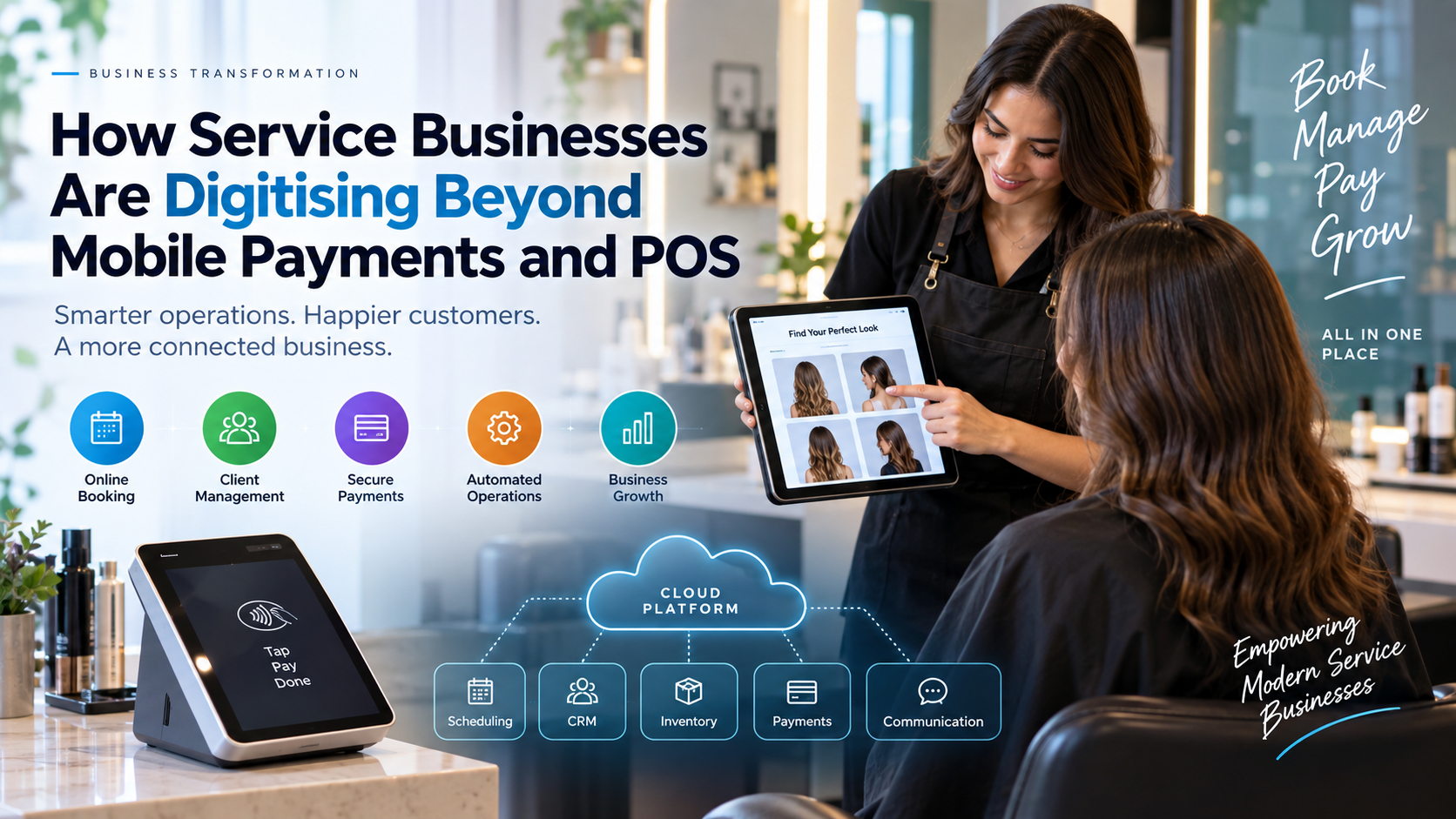
Digital transformation beyond mobile payments means unifying every customer and back-office touchpoint, from booking and intake to inventory and CRM, into a single cloud ecosystem. Modern service providers replace legacy checkout hardware with integrated platforms that automate administrative workloads.
The Evolution from Legacy Hardware to Cloud Ecosystems
Traditional Point of Sale (POS) hardware relies on standalone terminals tied to proprietary local servers. Modern operators replace these setups with cloud-native architectures. Devices like Android-based Smart POS terminals, mobile SoftPOS applications, and Business Internet of Things (BIoT) hardware connect directly to cloud management suites.
Modern payment infrastructure decouples transaction processing from physical terminals through open APIs. Consumer endpoints, including smart TVs, self-service kiosks, mobile apps, and embedded IoT sensors, act as functional transaction points. Mobile POS (mPOS) tools allow field technicians to build estimates, collect client signatures, and pull up historical logs right at the job site.
Core Components of Integrated Service Platforms
Unified business platforms bring operational, communication, and financial functions into one cloud database. Key features include:
- 24/7 Self-Service Scheduling: Clients book, modify, or cancel appointments online at any time without staff intervention.
- Real-Time Calendar Synchronization: Bi-directional calendar sync updates availability across all staff devices instantly to stop double-booking.
- Digital Intake and Waivers: Automated systems request forms, contracts, and liability waivers before appointments to eliminate administrative delays on-site.
- Integrated Client Records: Databases pull together service history, personal notes, past invoices, and communication logs under unified client profiles.
Adopting an all-in-one scheduling software like Booksy Biz gives service businesses a way to manage appointments, staff schedules, and client communications on a single cloud platform. This unified approach replaces disconnected, single-purpose software solutions.
How Cloud Scheduling and Operational Automation Streamline Workflows
Automated operational workflows eliminate administrative delays by handling appointment booking, inventory tracking, and contract execution without manual intervention. Centralized platforms connect daily routine tasks directly to back-office management engines.
Automated Intake, Waivers, and Field Operations
Digital workflows begin before a client steps into an establishment or before a field worker arrives on-site. Systems issue intake forms, liability waivers, and contract agreements automatically through integrations with electronic signature platforms. Clients complete these digital documents on their own devices prior to the service window.
Field service businesses utilize specialized mobile tracking applications. Technicians update job statuses in real time, upload photo documentation of completed repairs, and log billable hours directly from the field. This field data syncs immediately with central back-office software.
Automated Inventory and Accounting Integration
Automated inventory management tracks product depletion relative to services rendered. Systems log stock usage automatically when staff complete specific appointments, such as salon chemical treatments or plumbing repairs.
- Stock levels update in real time based on completed work.
- Reorder rules trigger purchase orders automatically when supplies drop to set thresholds.
- Open APIs sync transaction data directly into back-office engines.
- Automated data flows reduce manual record-keeping errors across accounting frameworks.
What Role Do Smart POS, SoftPOS, and Embedded Finance Play?
Next-generation payment technologies turn standard smartphones and Android terminals into centralized hubs for embedded financial services and business management. Modern payment environments decouple transaction processing from standalone terminals.
SoftPOS and Smart POS Hardware Architectures
Software Point of Sale (SoftPOS) technology enables off-the-shelf mobile devices to accept contactless payments using native Near Field Communication (NFC) chips. The technology relies on Software-Based PIN Entry standards (SPOC and CPOC) certified by EMVCo to securely isolate payment data without external card readers. The PCI Security Standards Council set a formal sunset period for standalone SPOC and CPOC standards between May 1 and October 31, 2026, encouraging providers to transition toward unified Mobile Payments on COTS (MPoC) frameworks.
Smart POS terminals utilize open Android architectures to execute third-party operational applications directly on the payment device. Operators run scheduling software, inventory tracking, and CRM tools on the physical terminal itself.
Embedded Financial Services and Remote Invoicing
Embedded finance integrates specialized financial products directly into non-financial management platforms. Service businesses offer key capabilities at checkout:
- Buy Now, Pay Later (BNPL): Point-of-sale installment plans lower customer price resistance on major home repairs or specialized services.
- Pay-by-Link Invoicing: Automated billing systems deliver unique digital payment links via SMS or email for secure remote settlement.
- Instant Merchant Payouts: Platforms offer immediate access to settled funds rather than multi-day batch transfers.
- Automated Tax Accounting: Embedded engines automatically calculate and reconcile sales taxes across jurisdictions. For example, Sphere helps businesses manage sales tax, VAT, and GST across global markets.
Elevating Customer Relationships Through Intelligent CRM
Modern service CRMs centralize client service histories and automated communications to boost client retention and eliminate no-shows. Unified databases link every appointment, receipt, and preference to individual customer profiles.
Centralized Profiles and Automated Client Messaging
Centralized databases collect complete client logs across all service touchpoints. Staff members pull up past service notes, color formulas, equipment preferences, and itemized spend histories prior to each appointment.
Automated messaging workflows reduce missed appointments through timed notifications. Systems issue pre-service reminders via SMS or email directly to the client's phone. These automated reminders prevent lost booking revenue without requiring staff time.
Automated Feedback Loops and Review Generation
Integrated CRM tools initiate automated follow-up communications immediately after a transaction closes. The platform sends a post-service satisfaction survey or review prompt via SMS as soon as the client pays.
Prompting satisfied clients right away helps businesses gather positive online reviews on public portals. Early feedback alerts direct negative responses internally to management, resolving issues before public reviews appear online.
Selecting and Implementing a Cloud Management Architecture
Selecting a cloud management platform requires evaluating operational needs, technical security, and team onboarding workflows. Businesses follow a structured methodology to deploy new cloud systems across operations.
System Evaluation and Hardware Assessment
Operators begin by mapping administrative bottlenecks across front-office, back-office, and financial workloads. Organizations evaluate whether their model requires physical Android Smart POS hardware or software-based SoftPOS solutions on existing employee devices.
Security compliance forms a crucial prerequisite during evaluation. Management verifies that target platforms maintain current Payment Card Industry Data Security Standard (PCI DSS) compliance, apply end-to-end encryption (E2EE), and support necessary accounting API integrations.
Onboarding, Data Migration, and Staff Rollouts
Implementation follows a four-stage onboarding sequence:
1. Data Migration: Export historical client profiles, inventory lists, and service catalogs into the new cloud database.
2. Hardware Provisioning: Deploy Smart POS terminals and provision SoftPOS applications with role-based access controls.
3. Workflow Configuration: Set up automated SMS reminder rules, digital intake forms, and pay-by-link invoicing templates.
4. Staff Training and Launch: Train staff on mobile software interfaces, execute trial transactions, and launch a controlled rollout.
Conclusion
Service businesses are moving beyond traditional payment terminals by adopting cloud-based platforms that connect scheduling, CRM, payments, inventory, and customer communication. Technologies such as Smart POS, SoftPOS, and automated workflows can help businesses streamline daily operations while creating more convenient experiences for customers.
The right digital tools depend on each business’s operational needs, security requirements, existing infrastructure, and team capabilities. By carefully evaluating these factors and providing proper staff training, service businesses can build more connected, efficient, and scalable operations.
Frequently Asked Questions
1. What is the primary operational difference between a traditional payment terminal and a Smart POS system?
Smart POS devices run open operating systems like Android to execute full scheduling, inventory, and CRM software alongside payment processing. Standalone payment terminals only read card data and process transactions over basic networks without running business management applications.
2. How does automated scheduling benefit a small service business?
Automated scheduling lets clients book or modify appointments 24/7 online while sending automated SMS reminders that reduce costly no-shows. Platforms also capture booking deposits upfront during appointment creation to secure business revenue.
3. How does SoftPOS technology allow smartphones to process card payments safely?
SoftPOS isolates transaction data inside a secure software enclave utilizing standard NFC chips compliant with EMVCo security guidelines. Merchant applications meeting PCI SSC standards enable PIN entry directly on glass touchscreens without external card readers.
4. How does integrating CRM software with payment processing increase client retention?
Integrated CRMs merge payment histories, service preferences, and communication logs under a single client file to enable targeted marketing. Automated post-transaction SMS survey triggers capture client feedback instantly before negative public reviews occur.
5. What are the main implementation steps for deploying SoftPOS across a field service team?
Managers audit employee hardware to confirm device NFC capabilities and then deploy certified SoftPOS mobile applications. Administrators establish role-based permissions, configure