Connect with us
Kubernetes Orchestration Explained — A Complete Guide
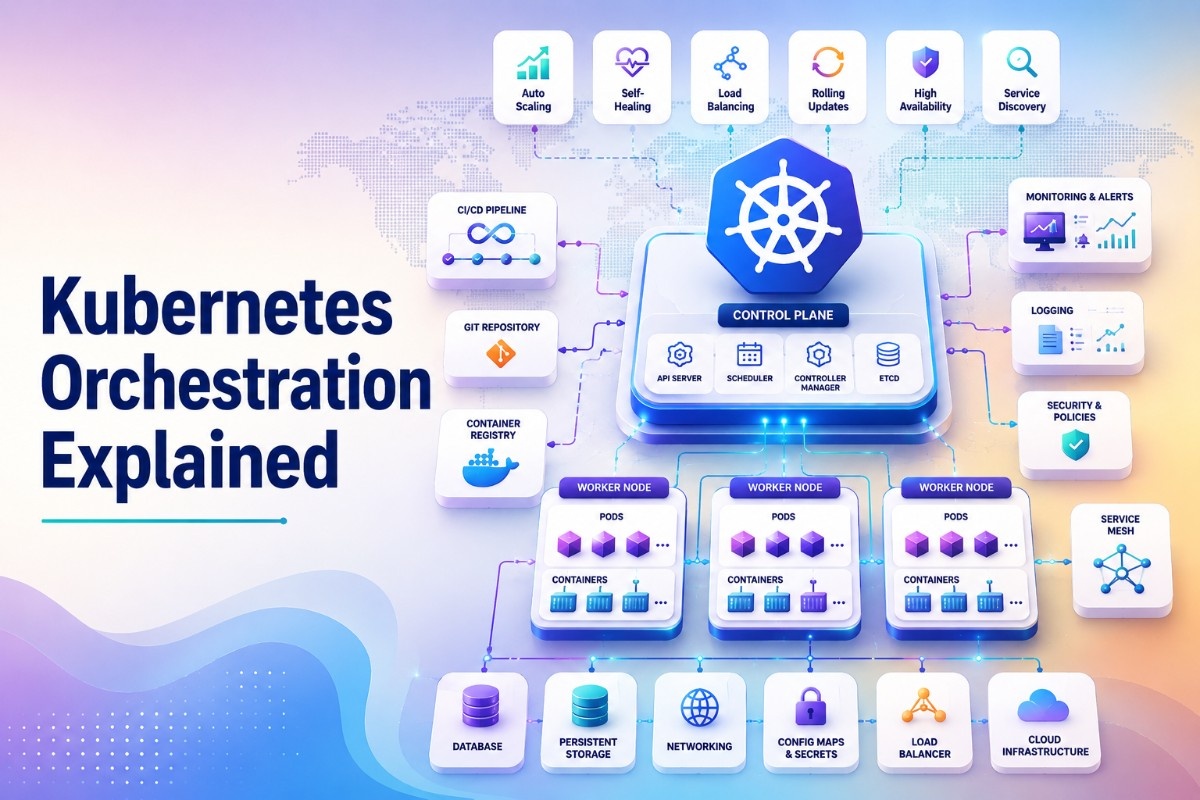
Kubernetes orchestration is the automated management of containerized applications across a cluster of machines handling deployment, scaling, load balancing, self-healing, and resource allocation without manual intervention, so engineering teams can run complex distributed systems reliably at scale. Rather than manually deciding which server runs which container, how many instances are needed, or what happens when a container crashes, Kubernetes orchestration handles all of that continuously in the background. It is the reason modern cloud-native applications can scale to millions of users, recover from failures in seconds, and be updated without downtime all through a declarative system where teams define what they want and Kubernetes figures out how to make it happen.
What Is Kubernetes Orchestration?
Kubernetes orchestration is the process by which Kubernetes automates the full lifecycle of containerized workloads from initial deployment through ongoing scaling, health monitoring, failure recovery, and eventual decommissioning.
Before container orchestration existed, deploying applications at scale meant manually managing which servers ran which services, writing custom scripts to handle failures, and scaling by hand when traffic spiked. Kubernetes replaced all of that with a declarative model: you describe the desired state of your application in configuration files, submit them to Kubernetes, and the orchestration layer continuously works to maintain that state regardless of what the underlying infrastructure is doing.
The core value of Kubernetes orchestration is not any single feature it is the combination of all of them working together as a unified system that eliminates entire categories of operational toil.
What Is Container Orchestration in Kubernetes?
Container orchestration in Kubernetes refers specifically to how Kubernetes manages the placement, lifecycle, and communication of containers across a cluster. Containers are lightweight, portable application packages but running them at scale introduces immediate operational challenges:
- Where does each container run when you have hundreds of servers?
- What happens when a container crashes at 3am?
- How do you update containers without taking your application offline?
- How do you route traffic to the right containers when instances are constantly starting and stopping?
Kubernetes container orchestration answers all of these questions automatically. It places containers on appropriate nodes based on available resources, restarts failed containers, manages rolling updates with zero downtime, and continuously updates service routing as containers come and go.
Kubernetes Container Orchestration — How It Works
Kubernetes orchestration operates through a continuous reconciliation loop:
- 1. You define desired state — using YAML manifest files, you declare what you want: three replicas of your web application, connected to a database, exposed on port 443, with a minimum of 512MB RAM per instance.
- 2. Kubernetes stores that state — the desired state is stored in etcd, the cluster's distributed key-value datastore.
- 3. The control plane reconciles — controllers continuously compare the actual state of the cluster against the desired state and make changes to close any gap. If a pod crashes, the controller creates a replacement. If load spikes, the autoscaler adds replicas.
- 4. Nodes execute — kubelet agents on each worker node receive instructions from the control plane and ensure the right containers are running, healthy, and connected.
- 5. Services handle traffic — Kubernetes Services provide stable network endpoints that route traffic to healthy pods automatically, even as individual pod IPs change.
This loop runs continuously Kubernetes never stops reconciling, which is what gives it its self-healing and self-managing characteristics.
Kubernetes Container Orchestration Definition
A precise definition: Kubernetes container orchestration is the automated coordination of containerized application deployment, scaling, networking, and lifecycle management across a distributed cluster, using a declarative configuration model and continuous reconciliation to maintain system stability without manual intervention.
In simpler terms you tell Kubernetes what you want running, and it handles everything required to keep that state true, continuously and automatically.
Kubernetes Orchestration vs Manual Container Management
Managing containers manually works at small scale but breaks down quickly as your application grows. Without orchestration, failure recovery means someone manually restarting crashed containers often at inconvenient hours. Scaling requires manually provisioning new instances. Deployment updates carry real downtime risk. Resource allocation is guesswork, leading to over-provisioned servers and wasted cost. Kubernetes orchestration eliminates all of these pain points through automation self-healing, autoscaling, rolling updates, and intelligent resource bin-packing keeping operational overhead consistent whether you are running ten containers or ten thousand.
Kubernetes Orchestration Platform — Choosing the Right One
Choosing a Kubernetes orchestration platform comes down to four considerations:
- Where your workloads run — if you are AWS-native, EKS reduces friction. If you span multiple clouds or on-premise infrastructure, a platform like Rancher that abstracts across providers makes more sense.
- Your team's operational capacity — managed platforms (EKS, GKE, AKS) remove control plane management. Self-managed options give more control but require more expertise to operate reliably.
- Compliance and security requirements — heavily regulated industries often benefit from OpenShift's built-in security controls and enterprise support model.
- Scale and resource constraints — for edge deployments, IoT infrastructure, or resource-constrained environments, K3s delivers full Kubernetes orchestration at a fraction of the resource footprint of a full cluster.
Container Orchestration Kubernetes — Core Concepts Explained
Understanding Kubernetes orchestration requires familiarity with its core building blocks:
- Pods — the smallest deployable unit. One or more containers that share a network and storage context, always scheduled together on the same node.
- Deployments — manage groups of identical pods, handling rolling updates, rollbacks, and replica count management automatically.
- Services — stable network endpoints that route traffic to healthy pods, abstracting away individual pod IP addresses that change as pods are replaced.
- Ingress — manages external HTTP/HTTPS traffic routing into the cluster, typically with SSL termination and path-based routing rules.
- ConfigMaps and Secrets — separate configuration and sensitive data from container images, allowing the same image to run differently across environments.
- Namespaces — logical partitions within a cluster that separate workloads, teams, and environments with independent access controls and resource quotas.
Orchestration Kubernetes — Key Terminology Simplified
For teams new to Kubernetes orchestration, the terminology can be the steepest part of the learning curve:
- kubectl — the command-line tool for interacting with a Kubernetes cluster
- Helm — a package manager for Kubernetes that bundles complex application deployments into reusable charts
- etcd — the distributed datastore where Kubernetes stores all cluster state
- kubelet — the agent running on every worker node, responsible for running pods as instructed by the control plane
- HPA (Horizontal Pod Autoscaler) — automatically scales pod replica counts based on CPU, memory, or custom metrics
- CRD (Custom Resource Definition) — extends the Kubernetes API to support custom resource types beyond built-in objects
Kubernetes Orchestration Tools — Best Options for DevOps Teams
Beyond the core Kubernetes platform, a healthy ecosystem of tools extends and enhances Kubernetes orchestration:
- ArgoCD — GitOps-based continuous delivery for Kubernetes. Syncs cluster state from Git repositories automatically, making all deployments auditable and version-controlled.
- Helm — the standard package manager for Kubernetes. Bundles multi-resource deployments into versioned charts with configurable values.
- Prometheus and Grafana — the standard observability stack for Kubernetes. Prometheus scrapes metrics from cluster components and workloads; Grafana visualizes them in dashboards.
- Karpenter — node autoscaling for Kubernetes that provisions exactly the right instance types for pending workloads, improving cost efficiency over traditional cluster autoscaling.
- Istio — a service mesh that adds mTLS encryption, traffic management, and observability between services running in the cluster.
- Velero — backup and disaster recovery for Kubernetes cluster resources and persistent volumes.
How to Use Kubernetes for GPU Orchestration
GPU orchestration with Kubernetes is increasingly critical for teams running machine learning training jobs, inference workloads, and AI pipelines at scale:
- NVIDIA Device Plugin — exposes GPU resources to the Kubernetes scheduler, allowing pods to request GPU allocation the same way they request CPU and memory
- Resource requests — pods specify GPU requirements in their manifest (nvidia.com/gpu: 1), and the scheduler places them only on nodes with available GPUs
- Node taints and tolerations — GPU nodes are typically tainted so only GPU-requesting workloads are scheduled there, preventing CPU-only workloads from consuming expensive GPU capacity
- Time-slicing — the NVIDIA device plugin supports GPU time-slicing, allowing multiple pods to share a single GPU for inference workloads that do not require a full GPU
- MIG (Multi-Instance GPU) — NVIDIA A100 and H100 GPUs support hardware partitioning into isolated GPU instances, each schedulable independently by Kubernetes
GPU orchestration through Kubernetes has become the standard approach for organizations running large-scale ML infrastructure on cloud or on-premise hardware.
Kubernetes Orchestration and Machine Learning — A Growing Use Case
Kubernetes has become the dominant platform for running machine learning workloads in production, driven by several characteristics that align well with ML infrastructure needs:
- Kubeflow — the most widely used ML toolkit for Kubernetes, providing pipelines, model training, hyperparameter tuning, and model serving components built as Kubernetes-native resources.
- Ray on Kubernetes — Ray is a distributed computing framework for ML workloads that integrates with Kubernetes for cluster-level resource management and scaling.
- Batch workload management — ML training jobs are batch workloads with distinct start and end points. Kubernetes batch controllers (Job, CronJob) and tools like Volcano handle scheduling and resource management for these patterns efficiently.
- Model serving — frameworks like KServe and Seldon deploy trained models as scalable, monitored API endpoints on Kubernetes, with autoscaling based on inference request volume.
Kubernetes Orchestration vs Manual Container Management
| Aspect | Manual Container Management | Kubernetes Orchestration |
| Failure recovery | Manual restart required | Automatic self-healing |
| Scaling | Manual instance provisioning | Automatic horizontal scaling |
| Deployment updates | Manual, high downtime risk | Rolling updates, zero downtime |
| Resource efficiency | Often over-provisioned | Bin-packing, optimized allocation |
| Operational overhead | High, grows with scale | Low, consistent regardless of scale |
The operational burden of manual container management grows linearly with the number of services and instances. Kubernetes orchestration keeps operational overhead roughly constant the same system manages ten containers or ten thousand with the same team effort.
Kubernetes Orchestration Best Practices for Production Teams
Use namespaces and RBAC together namespace separation is only meaningful when access controls prevent teams from touching each other's resources. Define RBAC roles scoped to namespaces from the start.
- Always set resource requests and limits — without them, the scheduler cannot place pods intelligently and a single runaway workload can destabilize an entire node.
- Implement health checks on every workload — liveness probes tell Kubernetes when to restart a container; readiness probes tell it when a container is ready to receive traffic. Both are essential for reliable orchestration behavior.
- Use Helm or GitOps for all deployments — avoid applying manifests manually with kubectl in production. All changes should flow through version-controlled, auditable deployment processes.
- Monitor the control plane separately — most teams monitor application workloads closely but neglect control plane health. etcd latency, API server request rates, and scheduler queue depth are early indicators of cluster-level problems.
For platform and DevOps teams managing production Kubernetes orchestration across multiple environments, clear and fast internal communication is as operationally critical as cluster health itself Troop Messenger gives distributed engineering teams a secure, structured channel for incident coordination, deployment communication, and cross-team operational alignment.
Conclusion
Kubernetes orchestration has become the default infrastructure layer for teams running containerized applications at any meaningful scale not because it is simple, but because the operational problems it solves are genuinely hard, and no alternative solves them as completely. From automated self-healing and zero-downtime deployments to GPU scheduling for ML workloads and multi-cluster service discovery, Kubernetes orchestration covers the full operational surface of modern cloud-native infrastructure. Teams that invest in understanding it deeply the control plane, the reconciliation model, the tooling ecosystem gain infrastructure that scales with their ambitions rather than against them. For the teams managing that infrastructure, Troop Messenger keeps communication as reliable as the systems they run.
Frequently Asked Questions
1. What is Kubernetes orchestration?
Kubernetes orchestration is the automated management of containerized application deployment, scaling, networking, and failure recovery across a cluster of machines. It uses a declarative model where teams define desired state and Kubernetes continuously works to maintain it without manual intervention.
2. What is the difference between Kubernetes and container orchestration?
Container orchestration is the broader concept automating the management of containers at scale. Kubernetes is the most widely adopted platform for implementing container orchestration, providing the tooling, APIs, and control systems that make orchestration practical in production.
3. What are the best Kubernetes orchestration tools?
The most widely used tools in the Kubernetes orchestration ecosystem include ArgoCD for GitOps-based deployment, Helm for package management, Prometheus and Grafana for observability, Karpenter for node autoscaling, and Istio for service mesh and traffic management.
4. How does Kubernetes handle GPU orchestration?
Kubernetes uses the NVIDIA Device Plugin to expose GPU resources to the scheduler, allowing pods to request specific GPU allocations. GPU nodes are typically tainted to reserve capacity for GPU workloads, and features like time-slicing and MIG allow multiple workloads to share GPU resources efficiently.
5. How is Kubernetes orchestration used for machine learning?
Kubernetes orchestrates ML workloads through tools like Kubeflow for pipeline management and model training, Ray for distributed computing, and KServe for scalable model serving. GPU scheduling support makes Kubernetes the standard infrastructure layer for large-scale ML training and inference operations.