Connect with us
Kubernetes Cluster Explained — Architecture, Diagram, and Management Guide
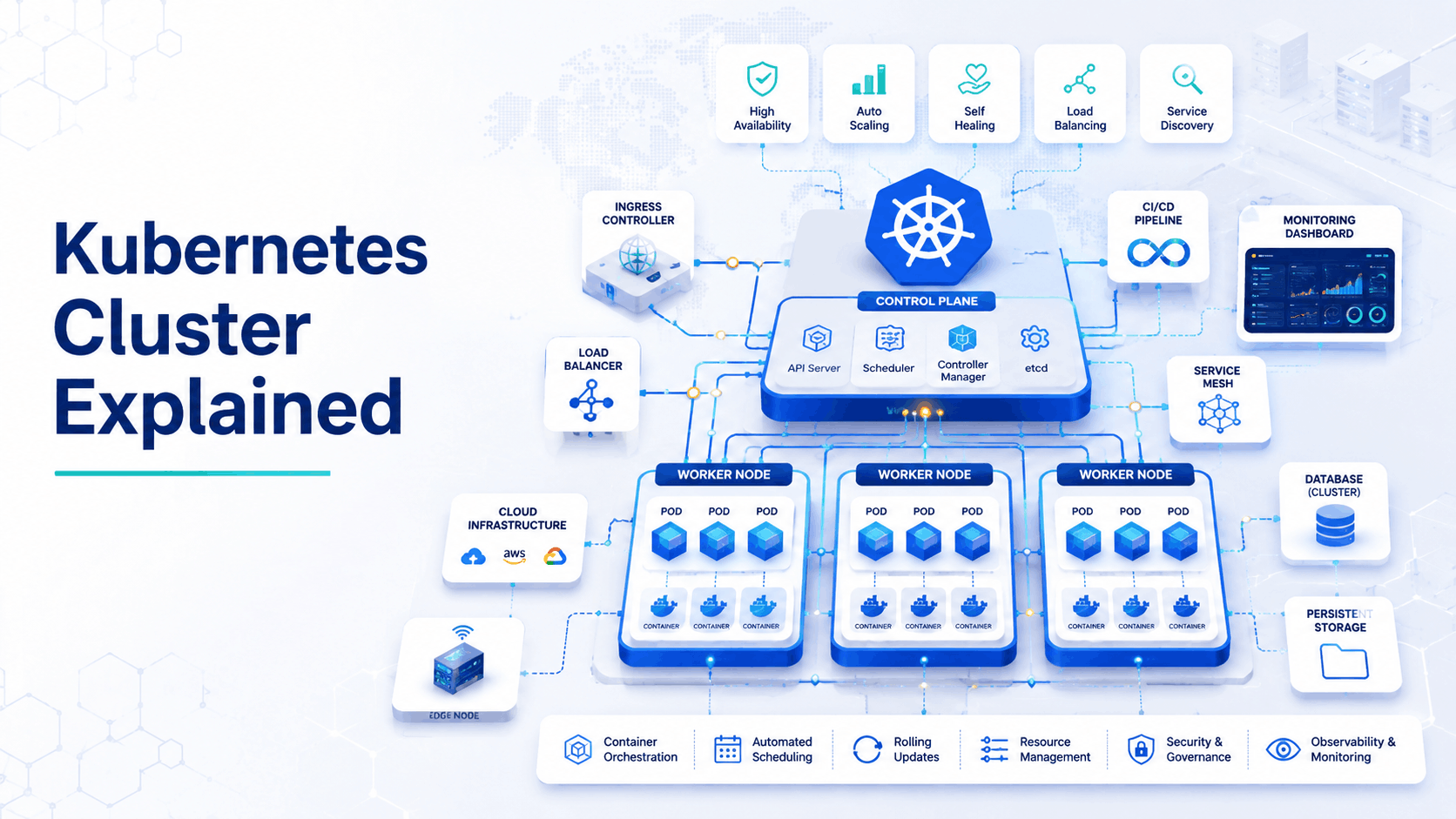
A Kubernetes cluster is a set of machines called nodes that work together to run, manage, and scale containerized applications, with Kubernetes acting as the orchestration layer that decides where workloads run, how they are distributed, and how the system recovers when something fails. Every Kubernetes cluster consists of two core parts: a control plane that manages the overall state of the cluster and makes scheduling decisions, and worker nodes that actually run the application containers. Kubernetes clusters can range from a single-node local setup for development to thousands of nodes running across multiple cloud regions in production.
What Is a Kubernetes Cluster?
A Kubernetes cluster is a group of compute nodes physical servers or virtual machines unified under the Kubernetes orchestration system to run containerized workloads reliably at scale. The cluster abstracts the underlying infrastructure, so developers and platform teams deploy applications to the cluster rather than to specific machines.
The cluster is responsible for:
- Scheduling — deciding which node runs which container based on available resources and constraints
- Self-healing — automatically restarting failed containers, replacing unhealthy nodes, and rescheduling workloads when a node goes down
- Scaling — adding or removing container instances based on load, either manually or through auto-scaling policies
- Service discovery and load balancing — routing traffic to the right containers automatically as the cluster state changes
What Is Kubernetes Cluster — A Simpler Explanation
If containers are the boxes your applications run in, Kubernetes is the warehouse management system and the cluster is the entire warehouse. Individual containers get placed into pods, pods run on nodes, and Kubernetes continuously manages where everything sits, ensures shelves do not overflow, and replaces any box that falls and breaks all without manual intervention.
A cluster is the fundamental unit of Kubernetes deployment. You do not deploy to a server you deploy to a cluster, and the cluster handles the rest.
Kubernetes Cluster Architecture — How It Is Structured
Every Kubernetes cluster follows the same fundamental architecture, built around two layers:
- Control Plane — the brain of the cluster. Manages the overall desired state, makes scheduling decisions, and maintains cluster-wide configuration. Runs on one or more dedicated master nodes.
- Worker Nodes — the muscle of the cluster. These are the machines that actually run your application containers, managed and monitored by the control plane.
Within these two layers, the key components are:
Control Plane Components: - API Server (kube-apiserver) — the front door to the cluster. All communication from kubectl commands, internal components, and external tooling goes through the API server
- etcd — a distributed key-value store that holds the entire cluster state and configuration. If etcd goes down, the cluster loses its source of truth
- Scheduler (kube-scheduler) — watches for newly created pods and assigns them to appropriate nodes based on resource availability, affinity rules, and constraints
- Controller Manager (kube-controller-manager) — runs background control loops that ensure the actual cluster state matches the desired state (restarting crashed pods, managing replica counts, etc.)
Worker Node Components: - kubelet — the agent running on every worker node that communicates with the control plane and ensures containers are running as expected
- kube-proxy — manages network rules on each node to enable communication between pods and services
Container runtime — the engine that actually runs containers (containerd or CRI-O are the most common in modern clusters)
Kubernetes Pods — Their Role Inside a Cluster
A pod is the smallest deployable unit in Kubernetes not individual containers. A pod wraps one or more containers that share the same network namespace and storage, and is always scheduled to run on a single node.
Key things to understand about pods in a cluster:
- Ephemeral by design — pods are not permanent. They are created, run, and destroyed as the cluster scales or recovers from failures
- Managed by higher-level objects — you rarely create pods directly. Deployments, StatefulSets, and DaemonSets manage pods, ensuring the right number are always running
- IP address per pod — each pod gets its own IP address within the cluster network, but that IP changes every time a pod is replaced — which is why Services exist to provide stable endpoints
- Resource limits — each pod can have CPU and memory limits defined, which the scheduler uses to place pods on nodes with sufficient available resources
Kubernetes Control Plane — The Brain of the Cluster
The control plane is what separates Kubernetes from simply running containers on servers. It maintains a continuous reconciliation loop constantly comparing the desired state you define (in YAML manifests) against the actual state of the cluster, and making corrections automatically.
If a node fails, the control plane detects that pods on that node are no longer healthy and reschedules them onto healthy nodes. If an application suddenly needs more instances to handle load, the Horizontal Pod Autoscaler in the control plane triggers new pod creation. If a deployment rollout causes errors, the control plane can automatically roll back to the previous stable version.
This self-healing, self-managing capability is what makes production Kubernetes viable at scale the control plane carries operational burden that would otherwise require constant human intervention.
Kubernetes Cluster Management — Best Practices
Managing a Kubernetes cluster well goes beyond initial setup:
- Use namespaces for isolation — separate workloads, teams, and environments (dev, staging, production) into distinct namespaces. This enforces resource quotas, access controls, and policy boundaries within a single cluster.
- Set resource requests and limits — always define CPU and memory requests and limits on pods. Without them, a runaway workload can exhaust node resources and destabilize the entire cluster.
- Automate with GitOps — use tools like ArgoCD or Flux to manage cluster configuration from Git. Changes to cluster state are version-controlled, auditable, and automatically applied rather than applied manually through kubectl.
- Keep the control plane highly available — run at least three control plane nodes in production to ensure etcd quorum and control plane availability survive a single node failure.
Regularly update Kubernetes versions ,running outdated cluster versions exposes you to known security vulnerabilities. Follow the upstream Kubernetes release cycle and plan upgrades proactively.
Kubernetes Multi Cluster Service Discovery
As organizations grow, they often operate multiple Kubernetes clusters for different regions, environments, or business units. Multi-cluster service discovery is the challenge of allowing services in one cluster to find and communicate with services in another.
The main approaches include:
- Kubernetes Federation — a native but complex approach for synchronizing resources across clusters
- Service mesh (Istio, Linkerd) — extends service discovery and traffic management across cluster boundaries with mTLS encryption and fine-grained traffic control
- External DNS with cloud load balancers — simpler approach using cloud provider DNS to route traffic between clusters
- Submariner — an open-source project specifically designed to connect multiple Kubernetes clusters at the network layer
Multi-cluster architectures add significant operational complexity. They are justified for global deployments, disaster recovery requirements, or strict regulatory data residency requirements.
How to Monitor a Kubernetes Cluster
Cluster Kubernetes monitoring covers three layers:
- Infrastructure monitoring — CPU, memory, disk, and network usage at the node level. Tools: Prometheus with Node Exporter, Datadog, or cloud provider native monitoring.
- Kubernetes object monitoring — pod health, deployment status, replica counts, and event streams. Tools: Prometheus with kube-state-metrics, Kubernetes Dashboard, Lens IDE.
- Application monitoring — latency, error rates, and throughput for workloads running inside the cluster. Tools: Prometheus with application metrics endpoints, Grafana dashboards, Jaeger for distributed tracing.
The standard production monitoring stack is Prometheus for metrics collection, Alertmanager for alert routing, and Grafana for visualization all deployable directly into your cluster via Helm charts.
How to Secure a Kubernetes Cluster
Kubernetes security operates across several layers:
- Role-Based Access Control (RBAC) — define exactly which users and service accounts can perform which actions on which resources. Follow the principle of least privilege no account should have more access than its function requires.
- Network policies — by default, pods in a cluster can communicate freely with each other. Network policies restrict traffic to only the paths your applications actually need, reducing blast radius if a workload is compromised.
- Pod security standards — enforce restrictions on what pods can do — preventing privilege escalation, restricting host network access, and requiring non-root container execution.
- Secrets management — never store sensitive values in plain Kubernetes Secrets without encryption. Use tools like HashiCorp Vault or AWS Secrets Manager integrated with your cluster for proper secrets lifecycle management.
- Image scanning — scan container images for known vulnerabilities before they are deployed. Tools like Trivy, Snyk, or cloud provider container registries with built-in scanning integrate into CI/CD pipelines.
For DevOps and platform teams managing cluster security policies and incident response across distributed Kubernetes environments, Troop Messenger keeps security and operations teams coordinated with structured, secure communication channels whether the incident is a misconfigured RBAC policy or a node going down at 2am.
Kubernetes Cluster vs K8s — Are They the Same Thing
K8s is simply shorthand for Kubernetes the 8 replaces the eight letters between K and s. So K8s and Kubernetes are the same thing. A Kubernetes cluster is a specific deployment of Kubernetes the actual running infrastructure where the Kubernetes system manages your workloads.
Think of it this way: Kubernetes (K8s) is the software and the orchestration system. A Kubernetes cluster is what you get when you run that system on a set of nodes. You can have multiple Kubernetes clusters each is an independent instance of the Kubernetes system managing its own set of nodes and workloads.
How to Run a Kubernetes Cluster — Getting Started
Depending on your use case, there are several ways to get a cluster running:
Local development:
- Minikube — single-node cluster running in a VM or container on your laptop. Best for learning and local testing
- Kind (Kubernetes in Docker) — runs a cluster inside Docker containers. Fast and lightweight for CI testing
- K3s — lightweight Kubernetes ideal for edge, IoT, and low-resource environments
Managed cloud clusters (production recommended):
- Amazon EKS — managed Kubernetes on AWS
- Google GKE — managed Kubernetes on Google Cloud, widely considered the most mature managed offering
- Azure AKS — managed Kubernetes on Azure, tightly integrated with Microsoft's ecosystem
Self-managed production clusters:
kubeadm — the standard tool for bootstrapping a production-grade Kubernetes cluster on your own infrastructure
For most teams new to Kubernetes, starting with a managed cloud offering removes control plane management overhead and lets teams focus on deploying workloads rather than operating the cluster itself.
Conclusion
A Kubernetes cluster is the operational foundation of modern container-based infrastructure managing where workloads run, keeping applications healthy, scaling automatically under load, and recovering from failures without human intervention. Understanding the architecture, from the control plane's reconciliation loops to the kubelet on every worker node, gives platform and DevOps teams the foundation they need to run clusters confidently in production. As cluster complexity grows across multiple environments, regions, and teams keeping the people managing that infrastructure as well-coordinated as the systems they run is equally important. Troop Messenger gives distributed DevOps and platform engineering teams the secure, structured communication layer to match the reliability of the clusters they manage.
Frequently Asked Questions
1. What is a Kubernetes cluster?
A Kubernetes cluster is a set of nodes physical or virtual machines that run containerized applications under Kubernetes orchestration. The cluster handles scheduling, scaling, self-healing, and service discovery automatically, abstracting the underlying infrastructure from application teams.
2. What is the difference between Kubernetes and a Kubernetes cluster?
Kubernetes (K8s) is the open-source orchestration system itself. A Kubernetes cluster is a specific running deployment of Kubernetes on a set of nodes. You can run multiple independent Kubernetes clusters, each managing its own workloads and infrastructure.
3. What does the Kubernetes control plane do?
The control plane manages the overall state of the cluster. It runs the API server, scheduler, controller manager, and etcd datastore continuously reconciling the desired state you define against the actual running state of the cluster and making corrections automatically.
4. How do I monitor a Kubernetes cluster?
The standard monitoring stack is Prometheus for metrics collection, Alertmanager for alerting, and Grafana for dashboards. Kube-state-metrics exposes Kubernetes object health, Node Exporter covers infrastructure metrics, and application-level monitoring uses workload-specific Prometheus endpoints.
5. How do I secure a Kubernetes cluster?
Kubernetes cluster security requires RBAC for access control, network policies to restrict pod-to-pod traffic, pod security standards to prevent privilege escalation, encrypted secrets management, and container image vulnerability scanning integrated into CI/CD pipelines.