Connect with us
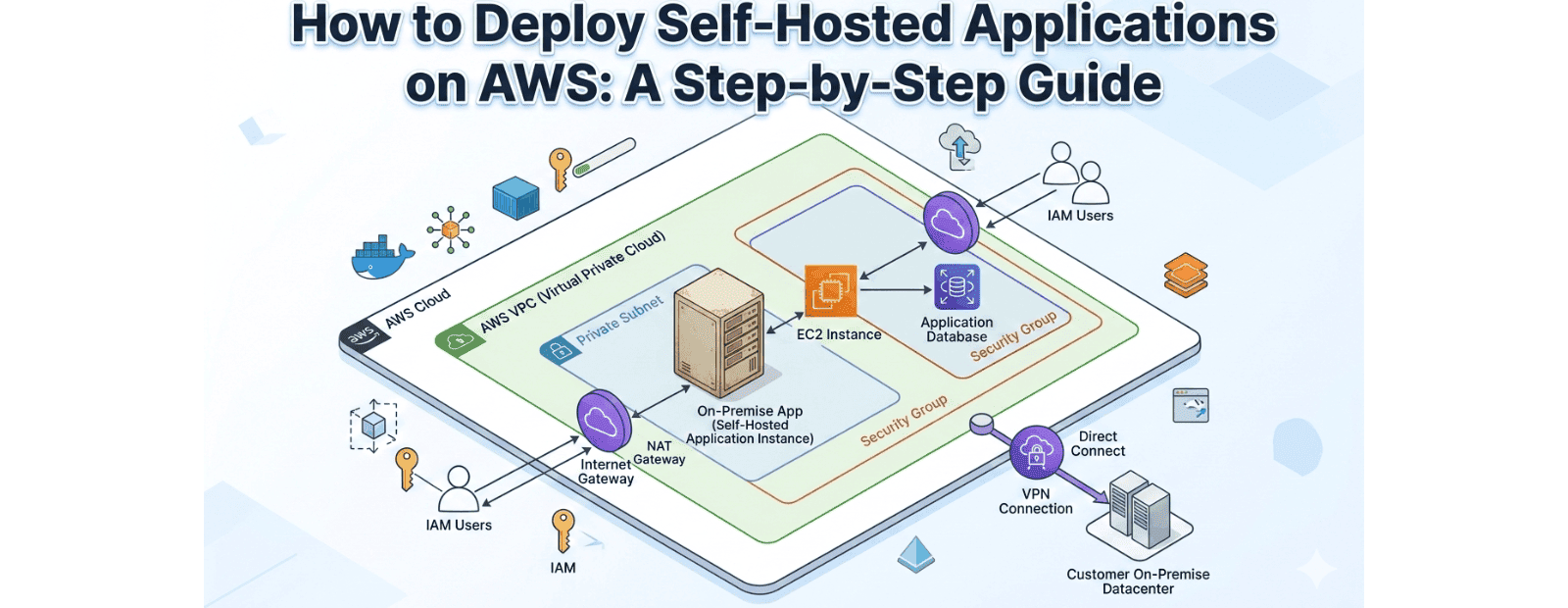
How to Deploy Self-Hosted Applications on AWS: A Step-by-Step Guide
Organizations increasingly want the control and security of self-hosted applications without the cost and complexity of maintaining physical data centers. Deploying self-hosted applications on AWS allows businesses to combine the benefits of on-premise infrastructure, such as data ownership, administrative control, and compliance, with the scalability and reliability of AWS cloud services. This guide explains how to deploy self-hosted applications on AWS step by step, covering infrastructure setup, security best practices, deployment architecture, and how enterprises can host communication and collaboration platforms in a secure AWS environment.
Industries such as real estate, logistics, healthcare, finance, and enterprise services are increasingly investing in secure digital infrastructure to support internal communication systems and business-critical applications. Organizations exploring private cloud deployments and self-hosted platforms are doing so to improve operational control, strengthen security, and meet evolving compliance requirements.
Why Modern Enterprises are Moving On-Premise Logic to AWS
In recent years, a growing trend known as cloud repatriation has emerged. Instead of relying completely on public SaaS platforms, enterprises are shifting toward private cloud environments where they control the application while cloud hosting providers like Atlantic.Net supply the infrastructure.
This hybrid approach combines the best aspects of on-premise deployment and cloud computing.
In a traditional setup:
- Organizations maintain physical servers
- IT teams handle infrastructure maintenance
- Data storage happens within internal data centers
But with AWS infrastructure:
- AWS manages the physical hardware
- Organizations manage the application and data
- Businesses maintain full administrative control
This model is particularly useful for organizations that require strict compliance, high security standards, and full data ownership.
AWS Self-Hosted Deployment vs Traditional On-Premise Infrastructure
| Feature | Self-Hosted on AWS | Traditional On-Premise |
| Hardware Management | AWS manages hardware | Internal IT team manages hardware |
| Data Control | High | Complete |
| Scalability | High | Limited by hardware |
| Upfront Investment | Low | High |
| Compliance Support | Strong | Strong |
| Infrastructure Maintenance | Reduced | Fully managed internally |
| Disaster Recovery | Built-in AWS services | Organization-managed |
| Global Accessibility | Excellent | Limited |
Key Benefits of Hosting Your Own Apps on AWS Infrastructure
Deploying self-hosted applications on AWS allows businesses to combine the benefits of on-premise infrastructure, such as data ownership, administrative control, and compliance, with the scalability and reliability of AWS cloud services.
Unmatched Data Sovereignty and Security
Data sovereignty has become a major concern for enterprises.
When organizations deploy on-premise style applications on AWS, they retain full control over:
- Application configuration
- Server access policies
- Data storage locations
- User permissions
This ensures sensitive business data remains within a controlled infrastructure environment rather than being stored inside third-party SaaS platforms.
For industries such as finance, healthcare, defence, and government sectors, this level of control is essential.
Reduced Latency for Global Teams
AWS operates data centers across multiple global regions.
By deploying applications closer to users, organizations can reduce latency and improve performance for distributed teams.
For example:
- Global teams can access collaboration tools faster
- Messaging platforms deliver real-time communication
- File transfers and data access become more efficient
This is especially beneficial for team communication platforms and enterprise collaboration tools.
Simplified Hardware Lifecycle Management
Maintaining physical servers is expensive and time-consuming.
Organizations must handle:
- Server procurement
- Hardware upgrades
- Cooling infrastructure
- Power redundancy
- Equipment failures
By hosting applications on AWS infrastructure, companies eliminate these operational challenges while still maintaining a self-hosted architecture.
AWS manages the hardware layer, while organizations focus on application management and security policies.
Step-by-Step: How to Deploy On-Premise Style Applications on AWS
Deploying an on-premise application on AWS involves setting up secure infrastructure and installing the application within that environment.
Below is a simplified deployment workflow.
Step 1: Create a Virtual Private Cloud (VPC)
A Virtual Private Cloud (VPC) creates a secure network environment inside AWS.
Within a VPC, organizations can configure:
- Private subnets for application servers
- Firewall rules using security groups
- Controlled inbound and outbound traffic
- Internal network routing
This setup mimics a traditional on-premise network architecture.
Step 2: Launch EC2 Instances
Next, launch Amazon EC2 instances that will host the application.
Depending on the architecture, organizations may deploy:
- Application server
- Database server
- Backup server
- Storage server
These instances form the core infrastructure for self-hosted AWS deployment.
Step 3: Configure Storage with S3
Reliable storage is essential for enterprise applications.
AWS provides S3 (Simple Storage Service) for storing:
- Application backups
- Media files
- Logs
- Disaster recovery data
This ensures that data remains secure, scalable, and easily retrievable.
Step 4: Install and Configure the Application
Once the infrastructure is ready, the application can be installed on the EC2 instance.
Typical setup tasks include:
- Installing software dependencies
- Connecting the application to its database
- Configuring administrator accounts
- Setting up user authentication
After installation, the application becomes accessible within the secure network environment.
Step 5: Configure Security and Access
Security is critical when deploying enterprise applications.
Organizations should implement:
- Firewall rules
- Restricted server ports
- VPN access for administrators
- Role-based access control
- Encryption for sensitive data
These measures help maintain a secure private cloud environment.
Case Study: Optimizing Secure Communication with Troop Messenger on AWS
Many enterprises deploy secure team communication platforms using this architecture.
Instead of relying on public messaging tools, organizations prefer self-hosted messaging systems to maintain control over internal communication data.
For example, businesses can deploy Troop Messenger On-Premise within AWS infrastructure.
In this setup:
- The application is hosted inside the organization’s AWS environment
- Communication data remains fully controlled by the enterprise
- Security policies are managed internally
- Administrators control user access and permissions
This will enable organizations to enjoy the security benefits of on-premise deployment, as well as the benefits of AWS’s global infrastructure and 24/7 uptime reliability.
This type of deployment is especially important for industries that prioritize secure communication.
Common Challenges and 2026 Best Practices
While there are benefits to be gained by running on-premise applications on AWS, there are some challenges that organizations should be aware of.
Cost Management
Cloud infrastructure costs can increase if resources are not monitored properly.
Best practices include:
- Monitoring server usage
- Scaling resources efficiently
- Automating shutdown of unused instances
Security Updates and Patch Management
Self-hosted applications require regular updates.
Organizations should ensure:
- Operating systems remain updated
- Security patches are applied regularly
- Access policies are reviewed frequently
These steps help maintain a secure and stable infrastructure environment.
AWS Services Commonly Used for Self-Hosted Application Deployments
When deploying self-hosted applications on AWS, organizations typically combine multiple AWS services to improve security, reliability, and scalability.
Common Services Include:
Amazon EC2
Hosts application servers, databases, and backend services.
Amazon VPC
Creates a private network environment similar to traditional on-premise infrastructure.
Amazon S3
Stores backups, logs, and application files securely.
AWS IAM
Controls user permissions and access management.
AWS CloudWatch
Provides monitoring, alerting, and performance tracking.
AWS Backup
Automates backup and disaster recovery processes.
Combining these services helps organizations create secure, enterprise-grade hosting environments while maintaining administrative control over applications and data.
Final Thoughts: Is the Hybrid AWS Approach Right for You?
As businesses continue to modernize their infrastructure, the combination of on-premise application control and AWS infrastructure reliability has become an attractive deployment strategy.
This hybrid approach allows organizations to:
- Maintain full control over applications
- Protect sensitive enterprise data
- Eliminate physical hardware maintenance
- Scale infrastructure based on demand
For companies that require security, compliance, and operational flexibility, deploying self-hosted applications on AWS infrastructure offers a powerful solution for modern enterprise environments.
Frequently Asked Questions
1. How to deploy self-hosted applications on AWS?
Deploying self-hosted applications on AWS is a method of establishing a secure environment wherein the organization is in control of the application, and the underlying computing services are provided by AWS.
The general steps for deploying the application are as follows:
- Creating an AWS Virtual Private Cloud (VPC)
A VPC provides a private network environment for the application to run securely.
- Launch Amazon EC2 instances
EC2 instances act as the servers that host the application and supporting services such as databases.
- Configure storage services
Use services like Amazon S3 for backups, file storage, and disaster recovery.
- Install the application and dependencies
Install required frameworks, databases, and application packages on the EC2 server.
- Configure security controls
Implement security groups, firewall rules, and encryption to protect the infrastructure.
- Enable monitoring and scaling
Tools like AWS CloudWatch help monitor performance and ensure the application runs reliably.
This approach allows enterprises to deploy on-premise style applications on AWS infrastructure while maintaining full control over their data and system configuration.
2. What is a self-hosted runner on AWS using GitHub?
GitHub self-hosted runner on AWS is a custom machine that can run workflows of GitHub, as opposed to running them with default runners.
Organizations use self-hosted runners running on AWS’s EC2 instances, as this provides them with more control over their build and deployment environment.
Key benefits include:
- More control over the build environment
- Ability to install custom tools and dependencies
- Faster deployment pipelines for enterprise applications
- Improved security for internal software builds
For enterprises running self-hosted applications on AWS, using GitHub self-hosted runners helps automate software delivery while maintaining full control over infrastructure and data.
3. What are self-hosted applications on AWS?
Self-hosted applications on AWS refer to the applications hosted by the organization using the infrastructure services provided by the AWS platform.
In this context, the organization uses the infrastructure services provided by the AWS platform, such as the EC2 servers, storage, etc., to host the applications.
This approach provides the organization with data sovereignty, security, and administrative access to the applications, which is beneficial for applications such as team communication tools, software applications, etc.