Connect with us

Why Enterprise Collaboration Tools & Platforms are the Present - And the Future
What are enterprise collaboration tools? Enterprise collaboration tools are software platforms that help businesses communicate, share information, manage projects, collaborate on documents, and connect employees across different locations. They have become increasingly important as organizations adopt remote and hybrid work environments.
Enterprise collaboration platforms bring together features such as instant messaging, video conferencing, file sharing, shared workspaces, project management, and application integrations. These capabilities help teams improve communication, stay connected, and work more efficiently.
In this guide, we explore the value, benefits, key features, and industry-specific applications of enterprise collaboration tools, along with how businesses can use them to create a more connected and productive workplace.
Effectiveness of Social Connection & Collaboration Platforms
Troop Messenger, Workplace by Facebook, Slack , and Microsoft Teams.
These are all examples of enterprise collaboration tools that businesses are using day in and day out, especially in today's context of a global pandemic. Innovative collaboration platforms offer a suite of social tools, including instant messaging, blogs, profiles, and shared workspaces, among others, to drive productivity and foster effective work relationships.
That said, it is important to remember that each enterprise collaboration tool appeals to different organizations based on their primary goals and specific needs. Consider the following examples:
- Workplace by Facebook is ideal for organizations that wish to tap into Facebook’s familiar features.
- Slack appeals to companies that can better integrate with its various APIs. Here's what Darko Jacimovic, the Founder of whattobecome.com, has to say about using Slack:
"Slack is neater, more useful, and more practical for people working within the organization. People can simply be divided by the projects and teams, and still, be in the same chat as everyone in the organization."
- G Suite platform appeals to organizations that wish to share documents that can be provided varying levels of permissions, both internally and externally. More importantly, organizations can edit the same document synchronously or asynchronously, without worrying about document “forking.”
- Google Hangouts is more useful for sending real-time messages and for conducting video and teleconference calls. Plus, its thorough search functionality allows the team to look for past projects in an instant.
- HubSpot is typically used by the Sales team to collaborate with digital marketing teams. It also nurtures potential clients down the sales funnel as seamlessly as possible and helps them do better funnel optimization. That's not all. Team members can leave notes, share documents, make changes, and get a glimpse of every activity across the various stages of the sales process.
All things considered, when selecting enterprise collaboration tools, it needs to be mentioned that prioritizing data privacy and security, without compromising on the user experience or productivity levels, is paramount and serves as the key differentiator between good and great collaboration software solutions.
The Value of Collaboration Platforms
"Companies should position enterprise collaboration platforms as the hub that connects IT systems, business applications, collaborative tools, and digital platforms.” - MIT Sloan Management Review
Typically, people think of enterprise social networking platforms as being limited to instant messaging tools. However, these tools come padded with other useful features such as:
- Video chat platform: " The global video conferring market will expand at a compound annual growth rate of 9.2% until 2025, growing that market to a value of $6.7 billion." - Bloomberg. Video chat platforms (think: Skype, Google Hangouts, and Zoom ) allow team members to drive video conferences, which are instant, easy to implement, and effective.
- Live chat: The live chat software allows team members to get in touch with each other in an instant, that too 24x7 - irrespective of geographical boundaries or time constraints. If you're still second-guessing about the effectiveness of collaboration, consider this: According to Salesforce, "86% of survey respondents believe that lack of collaboration causes failure of projects that they work on."
- Integration with other applications: Text-based chats such as HipChat and Slack, empower team members to share messages and feedback in real-time. Then, of course, there is project management software that offers an all-in-one approach to work management, allowing users to monitor tasks and projects, assign jobs, and review workflows.
All these value-added features enhance the overall user experience while allowing them to connect with each other on a personalized level and at their own convenience.
Advantages of Online Collaboration
"Because we have access to very good tools in our private lives, we expect the same level of functionality and performance in business.” - Jeffrey Mann, Vice President of Research at Gartner
The paradox of online collaboration is this: Employees are working alone from home, but they are together, virtually.
The workforce of today has truly gone global in the literal and figurative senses of the term. Issues such as varying time zones, diverse geographical locations, multi-lingual workforce, etc. are no longer a hindrance to business continuity, owing to a wide plethora of online collaboration tools and flexible working practices at large. That is why more and more employers are opting for onboarding remote workers. And if you are thinking about it, Goco has a lot of useful tips for successful Remote employee onboarding.
Here's a quick snapshot of the tangible and intangible benefits they pose:
- Fosters a culture of 'flat' hierarchy where employees belonging to varying levels and functional areas work in conjunction with multiple teams, at any given point in time.
- Allows global collaboration among teams that are geographically dispersed.
- Helps teams to function effectively on a local, national, or international scale; while boosting leadership visibility and accessibility.
- Allows organizations to keep track of changes in real-time and collaborate online while tagging colleagues and reviewing documents on-the-fly.
- Fosters a more flexible working culture, which acts as a huge advantage from the employee's perspective.
- Offers cash benefits (according to a case study of the Workplace) by way of:
A. Effective organization-wide communication with monetary benefits of $3.3 million.
B. Enhanced teamwork and productivity, with benefits of $5.3 million.
C. An inter-connected work culture, with benefits amounting to over $4.5 million. - Finally, paves the way for a more enhanced, streamlined, and organized workflow where team members can review and upload documents online and make edits as necessary.
Major Benefits of Enterprise Collaboration
Whether you call it enterprise social networks or enterprise collaboration platforms, these super-useful tools work across teams, business systems, information, and applications to power productivity
- Boosts productivity: As per research by the McKinsey Global Institute, enterprise social networking tools help increase productivity by 25%, in addition to improving employee collaboration and communication.
- Added value across functions: According to a recent study by Forrester, the collaboration platform - Workplace by Facebook - can:
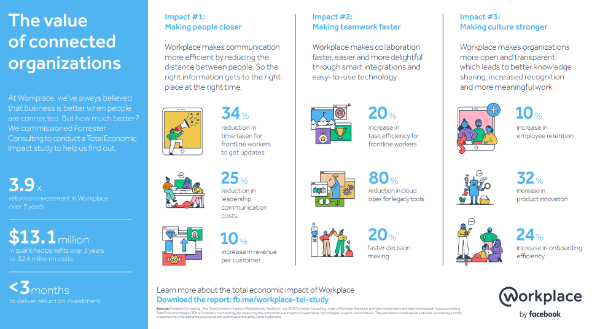
A. Offer a 3.9X return on investment over three years.
B. Reduce the time it takes to update frontline workers by 34%;
C. Increase task efficiency by 20%;
D. Reduce cloud operating expenses for legacy tools by 80%;
E. Accelerate the decision-making process by 20%;
F. Increase product innovation by 32%;
G. Increase onboarding efficiency by 32%.
Industry-Wise Strategies for Collaboration Platforms
Collaboration platforms can be tailored to suit specific industry needs. Here are some industry-wise strategies for collaboration platforms:
1. Healthcare
Enable secure communication and file sharing among healthcare professionals, streamline patient data sharing, and facilitate telemedicine for remote consultations.
2. Manufacturing
Enhance coordination between different teams and departments, enable real-time collaboration on production schedules, and provide a platform for sharing technical specifications and design files.
3. Retail
Foster collaboration between retail stores and headquarters, facilitate communication among merchandising and marketing teams and enable seamless inventory management and order fulfillment.
4. IT and Software Development
Facilitate agile project management, provide integrated development environments for coding collaboration, and offer channels for effective communication between developers and stakeholders.
5. Financial Services
Ensure secure document sharing for compliance purposes, enable real-time collaboration on financial models and reports, and provide communication channels for dispersed teams and remote advisors.
6. Education
Facilitate collaboration between educators and students, offer virtual classrooms for distance learning, and provide tools for sharing educational resources and assignments.
7. Professional Services
Enable collaboration and document sharing among consultants, lawyers, and other professionals, offer secure client portals for communication and file exchange, and facilitate project management and time tracking.
8. Nonprofit and NGOs
Provide a platform for collaboration between volunteers and staff, enable secure communication and file sharing for fundraising campaigns, and facilitate project coordination for social initiatives.
9. Marketing and Advertising
Foster collaboration between marketing teams, clients, and creative agencies, provide a centralized platform for campaign planning and content creation and enable efficient review and approval processes.
10. Construction and Engineering
Facilitate collaboration among architects, engineers, and construction teams, offer a platform for sharing project documentation and design changes, and enable real-time communication for efficient project management.
Closing Thoughts
Enterprise collaboration tools have become an important part of modern business communication and teamwork. They help organizations connect employees across locations, share information, manage projects, communicate in real time, and create more flexible working environments.
The right collaboration platform can do more than simply provide instant messaging. Features such as video conferencing, live chat, document sharing, application integrations, and project management can help teams improve productivity and maintain better visibility across their work.
However, businesses should choose collaboration software based on their specific requirements, including security, scalability, integrations, usability, and the needs of their teams. As remote and hybrid work continue to evolve, organizations that invest in effective collaboration tools can build stronger communication, better teamwork, and a more connected workplace.
Frequently Asked Questions
1. What are enterprise collaboration tools?
Enterprise collaboration tools are software platforms that help organizations communicate, share information, manage projects, and work together more effectively. They can include features such as instant messaging, video conferencing, file sharing, shared workspaces, document collaboration, and application integrations. These tools are especially useful for organizations with remote, hybrid, or geographically distributed teams because they provide a centralized environment where employees can communicate and collaborate regardless of their location.
2. What are the benefits of enterprise collaboration tools?
Enterprise collaboration tools can improve communication, teamwork, productivity, and information sharing across an organization. They allow employees to communicate in real time, collaborate on projects, share documents, track work, and stay connected across different locations. Businesses can also use these platforms to support flexible working arrangements, improve team coordination, and create more organized workflows.
3. What features should businesses look for in collaboration software?
Businesses should look for features that match their communication and workflow requirements. Common features include instant messaging, video conferencing, file sharing, project management, document collaboration, application integrations, search functionality, and security controls. Organizations should also consider usability, scalability, data privacy, and compatibility with their existing business systems before selecting a collaboration platform.
4. How do collaboration tools support remote teams?
Collaboration tools help remote teams stay connected even when employees work from different cities, countries, or time zones. Teams can use instant messaging, video calls, shared workspaces, file sharing, and project management features to communicate and coordinate work online. These capabilities reduce communication barriers and help employees maintain visibility into projects, tasks, and important business information without being physically present in the same workplace.
5. How do businesses choose the right enterprise collaboration platform?
Businesses should evaluate collaboration platforms based on their team size, communication requirements, security needs, existing software, budget, and working environment. Organizations should also consider whether they need features such as video conferencing, project management, file sharing, integrations, or remote collaboration. Comparing platforms based on functionality, usability, security, scalability, and overall business requirements can help companies select a solution that supports long-term productivity and collaboration.