Connect with us

Why Your Business Needs to Integrate an AI Chatbot in 2021
Chatbots sit in an interesting space in the digital world. On the one hand, they clearly offer potential. The ability to answer queries and take the menial workload off means more work-hours saved.
And yet, there are considerable hurdles to implement them. Firstly, AI-powered chatbots are hardly perfect. How many times have we had a hilarious encounter with a chatbot which keeps giving us answers we never asked?
Often, the very utility of conversational AI-powered chatbots is questionable. Chatbots can at best answer simple questions. But, depending on the complexity of a website development, such abilities may not be required at all.
All of this of course leaves many business owners hanging in the dark. Should they go for a chatbot or not? In the following paragraphs, we shall explore what chatbots are and whether they might be an asset worth investing in.
Types of chatbots
While chatbots may have started as simple query-answer engines, they’ve morphed into far more sophisticated tools today. So, we have two types of chatbots available today —
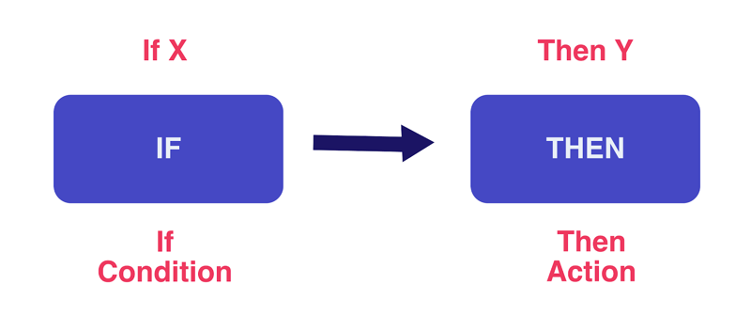
The original, simple chatbot which spits out programmed answers to expected questions. It simply says something like “I don’t understand,” or “let me redirect you to someone” when confronted with a question it can’t answer. A simple chatbot workflow looks like —
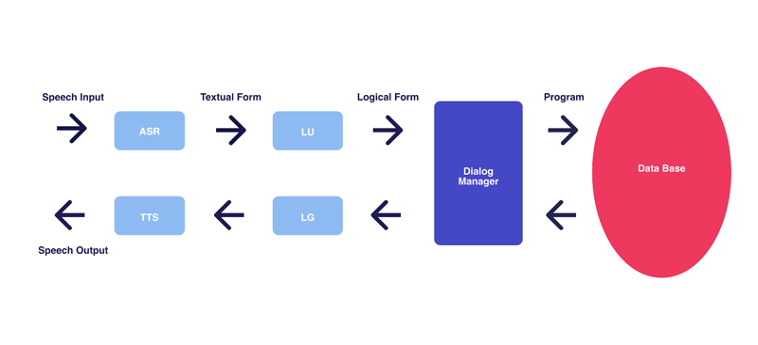
Conversational AI solutions capable of understanding user intent. Apple’s Siri would be a good example here. These systems have complex modules including Automated Language Recognition (ALR), Spoken Language Understanding (SLU), Dialog Manager (DM) and Natural Language Generation (NLG). A conversational UI will look something like —
The evolution of man-machine conversation is an interesting one, albeit beyond the scope of this article. Check out this piece on the difference between chatbots and conversational AI from which the definitions above are taken.
Figuring out whether your website needs a chatbot
Right, so chatbots have come a long way. But, do you even need one? Unfortunately, this is a tricky question to answer.
At the surface, chatbots do offer value. Any website could use a chatbot since they help users find the information they are looking for faster than searching the site manually. They also have a great ROI when compared to conventional labor scenarios like hiring a college student to work online and support your business. They are fairly different from team chat softwares.
Even so, chatbots aren’t exactly a fire and forget investment. You will need to set aside time and money to make them work. Not to mention, since conversational AI is an evolving technology, your chatbot will need periodic updates and maintenance.
But while the decision may seem perplexing, there are a few telltale signs you can use to determine whether you need a chatbot or not.
You offer a fairly technical product or service
The more technical a product gets, the more questions it inspires. More often than not, most questions will be similar. While you can always put together a FAQ section, chances are your audience may not be able to get to it, or will simply not bother to read it. Conversational AI chatbot solutions for websites will be ideal here.
For example, a European telecom company set up a pilot program to test conversational chatbots for common inquiries. After about five weeks of training, the chatbot was able to resolve 82% of the questions on its own, and 88% with some human help.
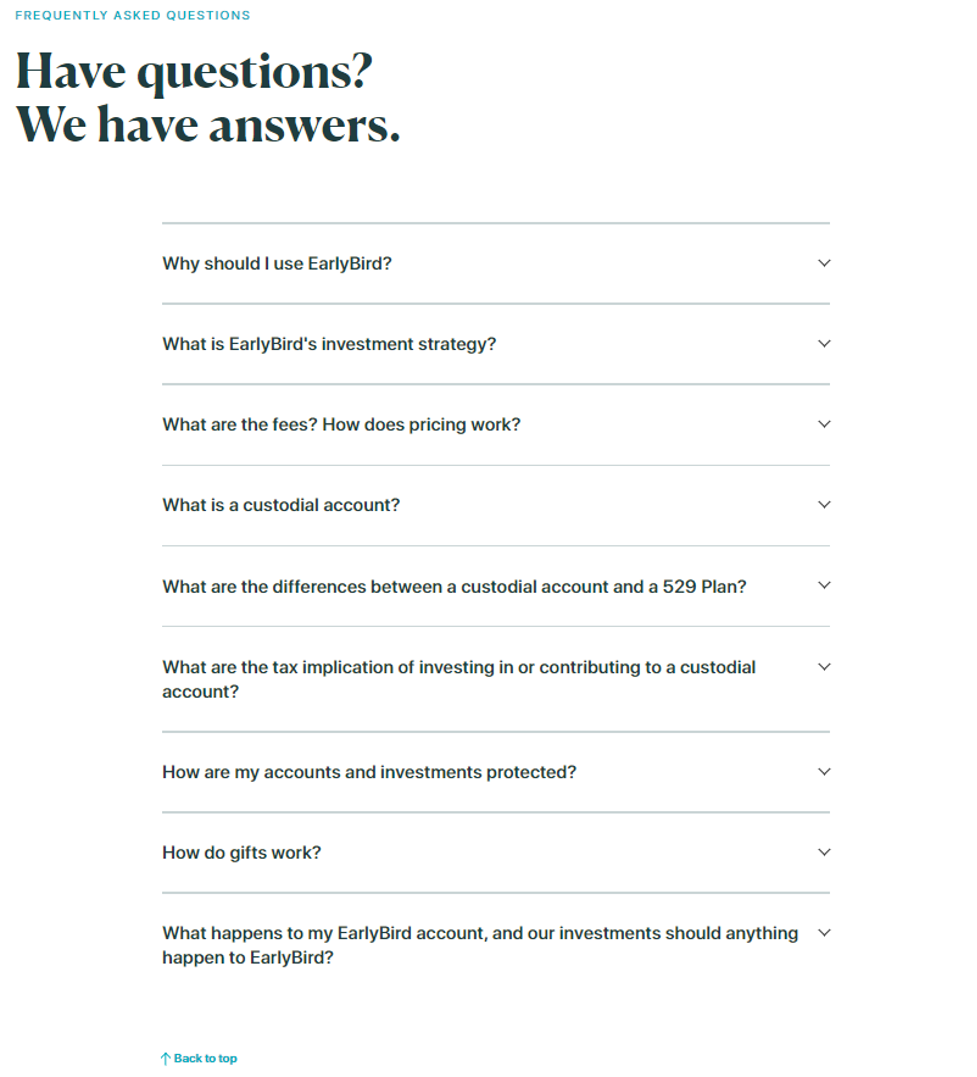
The same can hold true for any company offering technical products or services. The SaaS investment service EarlyBird for instance offers a service for parents looking to invest in their children.
In this case, anyone visiting can have a plethora of questions that the site can’t answer on the homepage itself. How does the investment work? Is there a maturity period? Will the investment command an interest? A conversational virtual assistant can prove valuable here.
Since the website already has an FAQ section, this can be expanded into a conversational AI chatbot.
Likewise, Inflow Inventory which offers an inventory software solution has quite a lot to explain in very short space. It can easily use a chatbot to answer questions its visitors are bound to have.
You offer a wide variety of products
There’s a rule in the digital marketing world — if someone can’t find what they’re looking for in 15 seconds, they’ll leave. Obviously, this doesn’t bode well for eCommerce websites with a lot to sell. That’s why businesses should create videos and embed them on the various pages of their website.
The more products you offer, the more content you need to put on your site. Consequently, there’s a greater chance someone won’t find what they’re looking for and leave. While search bars can help here, the problem can exacerbate if many of the products are similar in nature.
Check out LFA capsules fillers for example —
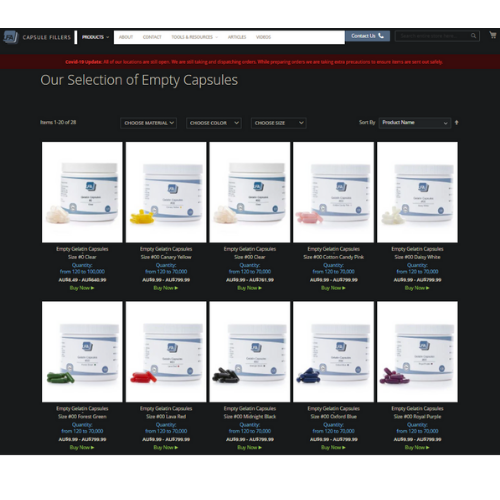
The website clearly has many products that are hard to tell apart. But, since a visitor may have specific requirements, they’ll have to go through the site to find the right fit. In this case, LFA capsule fillers can build some clever conversational engineering into their website and help visitors find what they’re looking for faster.
Similarly, the website Preply which offers an online space for tutors and language students to collaborate can also use a chatbot. First-time visitors might struggle to find the right tutor, in which case a conversational chatbot can understand their requirements, and direct them to the right tutor.
Currently, they offer live chat support only when agents are available. Visitors to their website need to check their support page for support timings and other ways to get help.

Your customer support staff spends more time answering generic questions
It takes a lot of time to train support staff to communicate properly with customers. And yet more often than not, they tend to answer questions that could’ve been solved with a simple search. Think questions like —
- What's the price of X product?
- How long does shipping take?
- How can I track my package?
- Who to contact for X issue? Etc
- Is there a coupon?
An AI chatbot can easily answer such questions. But, a chatbot can solve other problems too. Even though many of a customer’s questions will be simple, they may still have to face common customer support issues.
It can take far longer to get an available agent. Or, the support person may not know the answer. Or, the query gets redirected several times.
A chatbot is on 24/7, so, no waiting. It will also either know or won’t know, so, no umms or ughs. Finally, it can direct people to the exact resource since it can scan an entire database in a second or so.
The chatbot on this PLM company’s website is a great example of an AI chatbot:
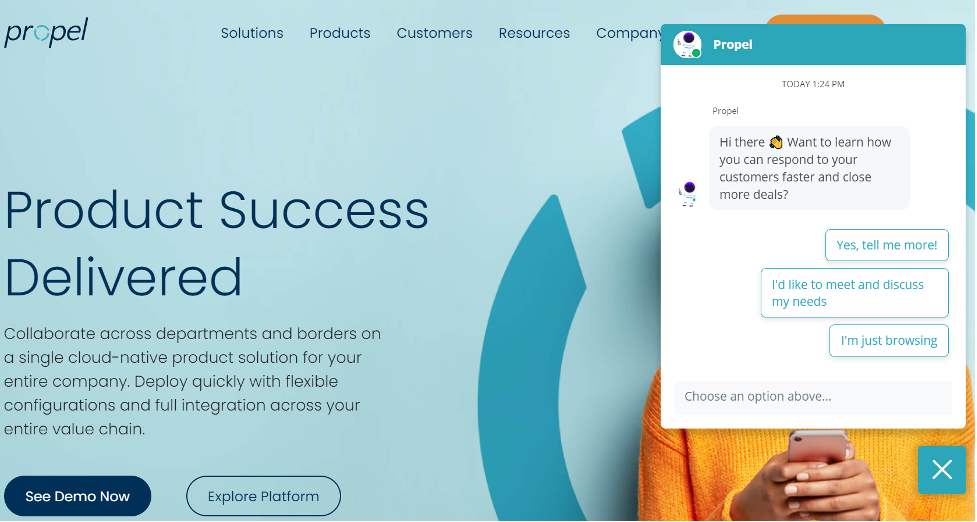
Based on the responses selected, the chatbot will provide and request specific information from the user. This keeps the responses provided relevant to every user's personal needs rather than spitting out one-size-fits-all responses.
For example, the train ticketing and reservation company Amtrak used chatbots to answer 5 million questions a year. They even made an astounding 800% return on their investment.
Features to include in your chatbot
There are bad chatbot implementations, and there are good ones. You don’t want your chatbot conversations to end up like this —
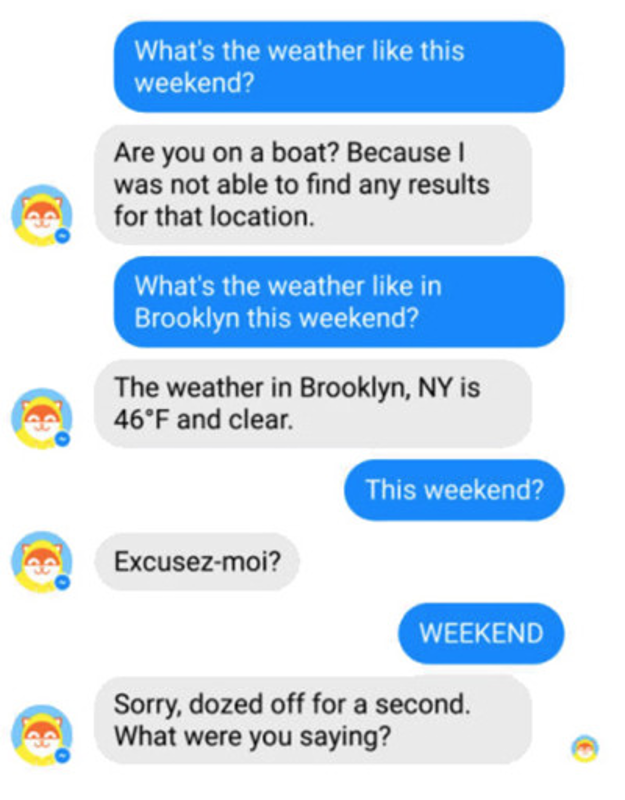
Again, training a conversational AI chatbot is not what we’re talking about here, but here’s an exhaustive resource on the same. Even when you do have a great chatbot, there are a few tweaks that can take it from good to great. Here are a few ideas —
Offer the most logical option right at the start
While people opening a chatbot will know what they are looking for, you can offer them options, too. Check out the chatbot implemented by Reply —

This is a fairly simple implementation. But Reply gets a few things right.
Firstly, the header says Reply Team. So, the user knows their messages will be delivered to a human, even if they are conversing with a bot.
Next, Reply offers marketing automation tools. The most logical course of action a user can take is to book a meeting here. The bot then simply helps the user set up an appointment.
The takeaway is that your bot needn’t do it all. You can have it only dedicated to single tasks like scheduling appointments or finding articles.
In case there’s no answer, let the visitor know when you’ll reply
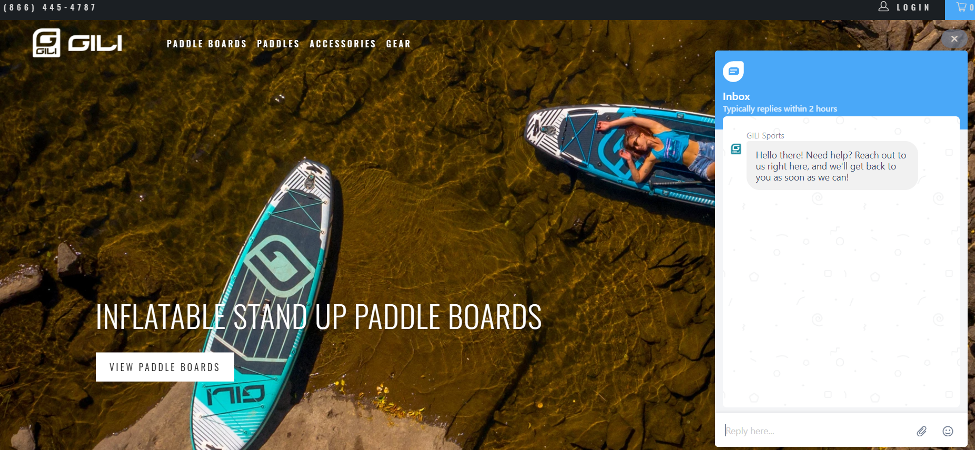
It’s entirely possible that your chatbot won’t be able to help visitors at times. In such cases, be sure to show the time it will take for an agent to get back to them. This may seem like a small point, but your visitors will appreciate it.
For example, GiliSports showcases the time they take to get back to their visitor’s queries on their chatbot —
Let your chatbot flaunt your style
A chatbot’s utility is obvious in how effectively it can understand and answer queries. Even so, no one will want to communicate with a robot. One way to give your bot some style will be to identify it with what you do.
Runners Athletics will be a good example here. The company offers glasses for runners. And the chatbot invites the site visitors to talk with fellow runners.
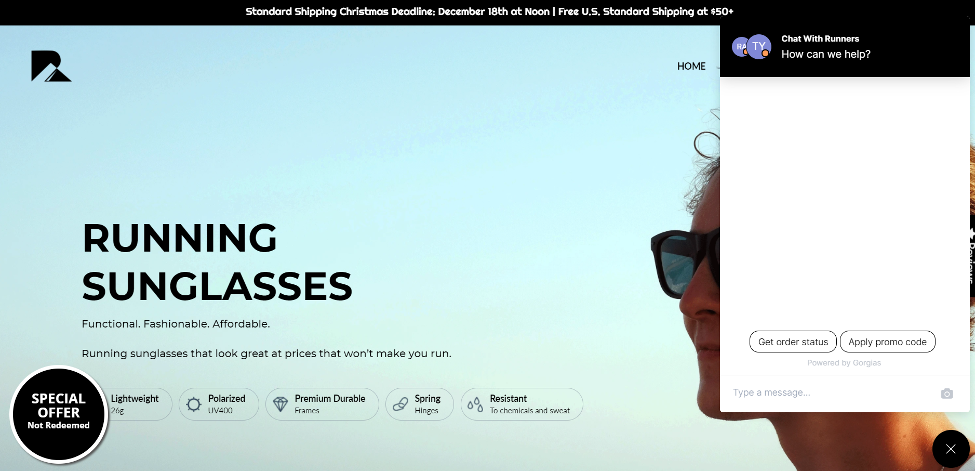
Include a human picture in your chat box
Communicating with a bot isn’t something most people are going to be used to. You can make the conversational chatbot ineasier by including visuals in your chat box.
A great way here is to add a picture. It can either be that of the customer support agent who handles redirected requests, or, even a stock photo. Check out the chat box used by Goaura —
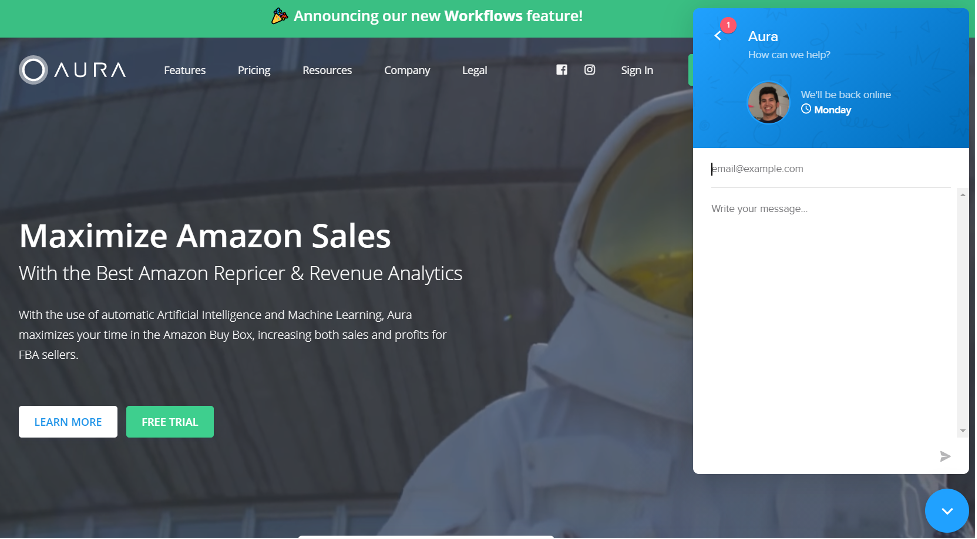
Another way to make your chat more human is to directly inform your customers that they will be talking to a real person, as you can see above with GoAura. Moreover, it has a friendly picture and information about when the user can expect an answer from an agent. Both of these inclusions help keep the conversation polite, predictable, and easy.
Conclusion
Despite the hurdles mentioned above, chatbot adoption rates continue to rise across the board. In fact, according to Deloitte, by 2022, we’ll be chatting more with chatbots than our spouses.
Conversational AI certainly offers a solution to mundane business issues, and, you should at the very least give it a whirl.