Connect with us
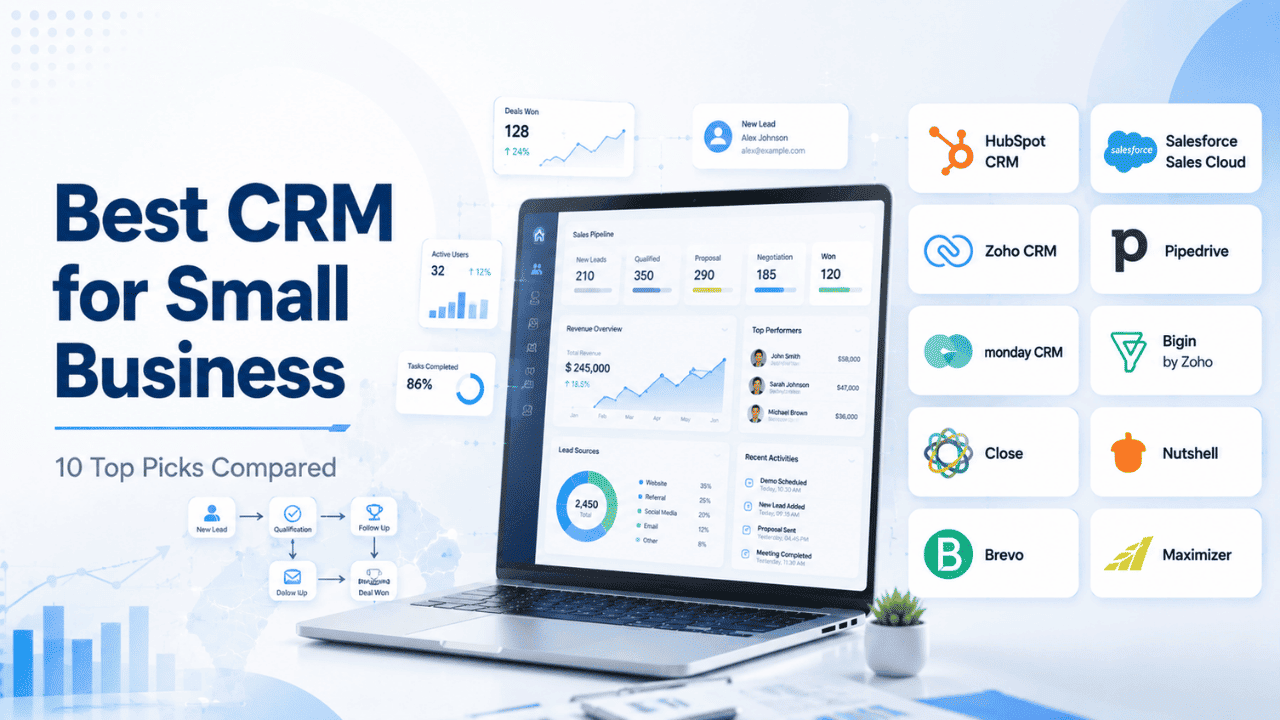
Best CRM for Small Business: 10 Top Picks Compared
A Customer Relationship Management (CRM) system is software that helps businesses organize customer information, track sales opportunities, manage communications, and build stronger customer relationships from a single platform. For small businesses, a CRM reduces manual work, keeps leads from slipping through the cracks, and makes it easier to deliver consistent customer experiences as the business grows.
Running a small business means juggling leads, follow-ups, invoices, and customer conversations, often without a dedicated sales team to manage it all. This is exactly where a CRM steps in. Choosing the best CRM for small business operations doesn't have to be complicated, and you don't need an enterprise-level budget to get real value from one. This guide compares 10 CRM tools, five widely recognized platforms and five lesser-known but highly capable alternatives, to help you find the solution that best fits your team's workflow, budget, and growth plans.
What to Look for in a CRM for Small Business
Before comparing tools, it helps to know what actually matters for a smaller team. Unlike large enterprises, small businesses usually don't have a dedicated CRM administrator, so ease of setup and daily usability carry more weight than an endless feature list.
A few things worth prioritizing:
- Simplicity — Your team should be able to log in and start using it within a day, not a week of training.
- Pricing that scales — Look for tools with a genuine free tier or an affordable entry plan, since overpaying for unused features is a common small-business trap.
- Integrations — A CRM works best when it connects with your existing email, calendar, and support tools rather than sitting in isolation.
- Mobile access — Field sales reps and solo founders often manage leads from their phones between meetings.
- Support quality — When something breaks, small teams can't afford long downtime waiting on a support ticket.
CRM software also pairs well with how your team communicates internally. If your sales and support reps are constantly switching between tools to update a customer record, that friction adds up. Many small businesses solve this by pairing their CRM with a lightweight collaboration tool so updates and customer context don't get lost in email threads.
How We Picked These CRMs
Instead of relying on marketing pages alone, this list was shortlisted using G2's Small Business CRM category, which only includes products with a meaningful number of verified reviews from actual small-business users. That filter matters, because a tool that's popular with enterprise buyers isn't always the right fit for a five-person team.
The five popular picks below are names most business owners have already come across. The five lesser-known picks are tools that consistently earn strong small-business satisfaction scores on G2 despite lower brand recognition, worth a look if you want something leaner or more affordable than the big names.
5 Popular CRMs for Small Business
HubSpot CRM
HubSpot started out as an inbound marketing platform and later built its CRM to sit at the center of that ecosystem, which is why it still feels tightly connected to marketing, sales, and service tools rather than functioning as a standalone contact database. It's designed so a small business can begin with just the free CRM and gradually add modules like marketing automation or a help desk as the company grows, without needing to migrate to a different platform later. This "start small, expand later" structure is a big part of why it's often the first CRM recommendation for businesses that don't yet know exactly what they'll need in a year or two.
Best for: Teams wanting an all-in-one CRM with room to grow into marketing and support tools.
Key features: Contact and deal tracking, email templates, meeting scheduling, and a genuinely usable free plan.
Pros: Very easy onboarding, strong free tier, clean interface.
Cons: Costs climb quickly once you need advanced automation or reporting.
Pricing: Free plan available; paid plans start in the mid-range for growing teams.
HubSpot's core CRM product is often the first stop for small businesses because it doesn't force you to pay upfront just to try it out.
Salesforce Sales Cloud
Salesforce is one of the oldest and most established names in CRM, and Sales Cloud reflects that maturity through its depth of customization. It was originally built with larger sales organizations in mind, which explains why small businesses sometimes find the setup process more involved than lighter competitors. That said, its App Marketplace (AppExchange) gives access to thousands of add-ons, so a small business that outgrows a simpler tool often lands here specifically because almost any workflow can eventually be built into it. It tends to suit businesses that already anticipate scaling into a larger sales operation rather than staying lean indefinitely.
Best for: Small businesses that expect to scale into a mid-market or enterprise setup later.
Key features: Customizable dashboards, pipeline visibility, extensive third-party integrations.
Pros: Highly scalable, deep reporting capabilities, huge integration ecosystem.
Cons: Steeper learning curve and higher cost relative to simpler tools.
Pricing: No permanent free tier; plans are priced per user per month.
For businesses that want a long-term platform rather than a stopgap tool, Salesforce's CRM software overview is worth reviewing to understand what "growing into" the platform actually looks like.
Zoho CRM
Zoho CRM is part of a much larger suite of business tools built by Zoho Corporation, covering everything from accounting to HR to helpdesk software. For small businesses already using other Zoho products, the CRM slots in with minimal extra setup since customer data flows between tools automatically. Its pricing has historically stayed lower than comparable competitors, which has made it a long-standing favorite among cost-sensitive small businesses in regions like India, Southeast Asia, and parts of Europe, though it has a genuinely global user base at this point.
Best for: Budget-conscious teams that also use other Zoho products.
Key features: Sales automation, multichannel engagement, workflow customization.
Pros: Affordable, integrates well with the wider Zoho suite, easy to learn.
Cons: Interface can feel cluttered once you add multiple modules.
Pricing: Free tier for very small teams; paid tiers remain competitively priced.
Pipedrive
Pipedrive was built by former salespeople who were frustrated with how complicated existing CRMs were for the actual job of moving deals forward. That origin shows in the product itself, the entire interface is organized around a visual pipeline rather than a traditional database-style layout. It intentionally avoids trying to be a full marketing or service platform, staying focused on sales pipeline management, which is exactly why sales-only teams tend to prefer it over broader all-in-one tools.
Best for: Sales-first teams that want a visual, pipeline-driven workflow.
Key features: Drag-and-drop pipeline view, activity reminders, deal tracking.
Pros: Intuitive pipeline management, reasonably priced for small teams.
Cons: Automation and email marketing features are fairly basic compared to competitors.
Pricing: Paid plans only, but priced accessibly for small sales teams.
If pipeline visibility is your main priority, Pipedrive is built almost entirely around that single use case, which keeps it simple.
monday CRM
monday CRM is built on top of monday.com's Work OS, a flexible project-management foundation originally designed for general team workflows rather than sales specifically. Because of that background, it's unusually customizable through boards and automations without requiring technical setup, which appeals to teams that want a CRM that can be reshaped around their exact process rather than forcing their process to match the software. It's popular with small businesses partly because many of them already use monday.com for other work, so adding the CRM keeps everything under one roof.
Best for: Teams that want to customize their CRM without technical setup.
Key features: Flexible boards, workflow automation, visual sales tracking built on the monday.com platform.
Pros: Very intuitive, fast onboarding, minimal learning curve.
Cons: Can require some tinkering to get advanced reporting exactly right.
Pricing: Tiered plans based on team size and feature needs.
Small businesses make up the majority of monday CRM's user base, which says a lot about how approachable it is for non-technical teams.
5 Lesser-Known CRMs Worth Considering
Bigin by Zoho
Bigin was launched by Zoho specifically as a response to feedback that full CRMs like Zoho CRM were too much for very small teams and solo founders. It deliberately strips away advanced customization and reporting in favor of a clean, minimal experience that can be set up in under an hour. It's essentially built for the business that has outgrown spreadsheets but isn't ready for, or doesn't need, a full-scale CRM system.
Best for: Very small teams or solo founders who find full CRMs overwhelming.
Key features: Contact management, basic pipelines, email integration, simple automation.
Pros: Extremely affordable, clean and lightweight design, quick to set up.
Cons: Limited customization and fewer advanced reporting options.
Pricing: Among the most budget-friendly CRMs on this list.
Bigin was built specifically to strip away the complexity that makes larger CRMs intimidating for first-time users.
SendPulse CRM
SendPulse started out as an email marketing and chatbot platform, and its CRM is built to sit in the middle of those channels, so it doesn't work as a standalone contact database. Conversations from WhatsApp, Instagram, Facebook Messenger, Telegram, TikTok, and Viber come into one shared inbox. Each new request automatically gets a contact card, and your team can create deals, assign chats, and take payments without leaving the conversation. That makes it a strong fit for small businesses whose customers mostly get in touch through social media and messaging apps, since email and web forms aren't their main channel.
Best for: Scaling businesses that sell and support customers through social media and messaging apps.
Key features: Unified inbox for messengers, email, calls, and SMS; automatic contact and deal creation from chats; sales pipelines and task boards; document generation for invoices and contracts; team performance reports.
Pros: Marketing, sales, and support live in one platform; usable free plan with no credit card required; unlimited contacts and deals on every plan.
Cons: The free plan caps sales pipelines and automation flows, so growing teams will need to upgrade fairly quickly.
Pricing: Free plan for up to five team members; paid tiers are budget-friendly and scale by team size.
SendPulse's CRM works best for teams that want customer conversations and the sales pipeline in one place.
Close
Close was built around a specific insight: most small sales teams don't need a CRM and a separate calling/email tool, they need both combined so reps aren't switching between apps constantly. It's particularly popular among remote-first startups and small agencies because calls, texts, and emails all get logged automatically against the contact record without manual data entry. This makes it a strong fit for outbound-heavy sales teams specifically, more than businesses focused on inbound lead management.
Best for: Founders and startups who want calling, SMS, and email built directly into the CRM.
Key features: Built-in communication tools, automation, coaching and reporting features.
Pros: Combines CRM and outreach in one place, fast for high-volume sales activity.
Cons: Some users report occasional lags with power-dialer features.
Pricing: Paid plans, positioned for lean sales teams that move quickly.
Nutshell
Nutshell was founded with a focus on B2B companies that wanted their sales and marketing teams working from shared data instead of separate systems that don't talk to each other. It's positioned as simple enough for a small business to adopt without a steep learning curve, while still offering enough depth in reporting and automation for teams that plan to scale over the next few years rather than staying static.
Best for: B2B teams that want sales and marketing working from the same system.
Key features: Pipeline management, email sequences, reporting dashboards.
Pros: Straightforward for new users, solid balance of simplicity and depth.
Cons: Some reporting customization requires higher-tier plans.
Pricing: Mid-range pricing aimed at small and growing teams.
Brevo (formerly Sendinblue)
Brevo rebranded from Sendinblue and has always leaned more heavily into marketing than traditional sales CRM. It combines email and SMS marketing automation with a built-in CRM layer, which makes it a strong option for small businesses where marketing outreach and customer relationship tracking are essentially the same job, often true for solo founders or very small teams wearing multiple hats.
Best for: Businesses that want CRM and email/SMS marketing under one roof.
Key features: Marketing automation, segmentation, built-in CRM contact management.
Pros: Strong automation for lifecycle campaigns, reasonable pricing.
Cons: Advanced analytics can feel limited compared to specialized CRM-only tools.
Pricing: Free tier available; SMS costs can add up with heavy use.
Maximizer
Maximizer has been around since the 1980s, making it one of the older CRM platforms still actively used today, and it has stayed relevant by focusing heavily on visibility into what's happening across a sales team's activity and pipeline. It doesn't have the brand recognition of newer tools, but it's maintained a loyal small-to-mid-size business user base that values dependable activity tracking over flashy interface design.
Best for: Teams that want clear visibility into deals and daily team activity.
Key features: Activity tracking, opportunity management, customizable dashboards.
Pros: Strong visibility features, dependable for tracking what's moving and what's stalled.
Cons: Less well known, so community resources and integrations are more limited.
Pricing: Custom pricing based on team size and requirements.
Best Free CRM for Small Business
If budget is the biggest constraint right now, several tools on this list offer a genuinely usable free tier rather than a stripped-down trial. HubSpot's free plan covers contact management, deal tracking, and email logging without a time limit. Zoho CRM and Bigin also offer free or near-free entry points for very small teams. Brevo's free tier is worth a look too if email marketing matters as much as contact management to you.
The key with free CRMs is understanding where the limits sit, usually around the number of users, contacts, or automation workflows, so you don't build your entire process around a plan you'll outgrow within a few months.
Best CRM for Small Business by Use Case
Best Sales CRM for Small Business
If your priority is moving deals through a pipeline efficiently, Pipedrive and Close both stand out for their sales-first design. Both keep the focus on activity tracking and deal progression rather than broader marketing features.
Best CRM for Small Construction Business
Construction businesses often need project-linked CRM data rather than a generic sales pipeline. While general CRMs like Zoho or monday CRM can be adapted with custom fields, dedicated construction-focused platforms exist for teams that need job costing and site-specific tracking layered on top of standard contact management.
Best CRM for Small Business in the UK
UK-based small businesses generally gravitate toward the same shortlist, HubSpot, Zoho CRM, and Pipedrive, since all three offer local currency billing, GDPR-aligned data handling, and solid UK-based support coverage.
Comparison Table
CRM | Known For | Starting Price | Free Tier | Best For |
HubSpot CRM | All-in-one growth platform | Mid-range paid tiers | Yes | Teams wanting room to scale |
Salesforce Sales Cloud | Deep customization | Higher-priced per user | No | Long-term scalability |
Zoho CRM | Affordability | Budget-friendly | Yes | Zoho ecosystem users |
Pipedrive | Visual pipelines | Accessible paid plans | No | Sales-first teams |
monday CRM | Flexibility | Tiered by team size | No | Non-technical teams |
Bigin by Zoho | Simplicity | Very low cost | Limited | Solo founders |
Close | Built-in outreach tools | Paid only | No | Fast-moving startups |
Nutshell | Sales + marketing balance | Mid-range | No | B2B teams |
Brevo | Marketing + CRM combo | Budget-friendly | Yes | Email-heavy businesses |
Maximizer | Activity visibility | Custom pricing | No | Deal tracking focus |
Once your CRM data is organized, it's worth thinking about how customer support tickets connect back to that same information. Teams that keep support and sales data in sync often rely on a dedicated help desk tool alongside their CRM so nothing falls through the cracks between departments. Pairing your CRM with a proper task manager also helps when follow-ups and internal to-dos need to stay visible beyond just the sales pipeline.
Final Thoughts
For most small businesses, HubSpot CRM remains the safest starting point thanks to its genuinely usable free tier and low setup friction. If you want something even leaner and don't need marketing features bundled in, Bigin by Zoho is the strongest hidden-gem pick on this list, built specifically for small teams that find larger platforms overwhelming.
Whichever CRM you choose, the goal isn't picking the tool with the most features. It's picking the one your team will actually use consistently, since a half-adopted CRM is often worse than no CRM at all.
Frequently Asked Questions
Q1. What is the best CRM software for small business?
There isn't a single universal answer, since it depends on budget and team size. HubSpot CRM is a strong starting point due to its free plan and easy setup, while Zoho CRM and Pipedrive suit teams wanting more pipeline control. Smaller teams often prefer Bigin for its simplicity. The right choice usually comes down to testing two or three shortlisted options directly.
Q2. What is the best free CRM for small business?
HubSpot CRM offers one of the most complete free plans, covering contact management, deal tracking, and email logging without a strict time limit. Zoho CRM and Bigin also provide usable free tiers for very small teams. Brevo is worth considering if email marketing matters as much as contact tracking for your business.
Q3. Are lesser-known CRMs safe to trust for a small business?
Yes, as long as they're backed by genuine user reviews. Tools like Close, Nutshell, and Maximizer consistently earn strong small-business satisfaction ratings on G2 despite lower brand recognition. Lower name recognition often just reflects smaller marketing budgets, not weaker product quality, so it's worth evaluating them on features and reviews rather than familiarity alone.
Q4. How do I choose between a popular CRM and a niche one?
Popular CRMs tend to offer broader integrations and community support, while niche tools often provide a sharper focus on one workflow, like outreach or activity tracking. If your team's needs are straightforward, a lesser-known focused tool can be lighter and cheaper. If you expect to scale significantly, a widely adopted platform gives you more room to grow.
Q5. Can a small business really manage without a CRM?
It's possible early on with spreadsheets or notes, but this breaks down quickly once your customer base or team grows. Losing track of follow-ups, duplicate outreach, and scattered customer history are common signs a business has outgrown manual tracking. Even a lightweight, free-tier CRM tends to save more time than it costs once contact volume passes a few dozen active leads.